
Overview

Problem

Technical Wall

Design Pivot
System Impact

Outcomes

Retrospective


Overview
Problem
Technical Wall
Design Pivot
System Impact
Outcomes
Schema Editor
Rational Logic Foundations
Establishing the foundational data blueprint for the ecosystem by solving for “confident mistakes” through staged validation and progressive logic
Schema Editor Rapid Prototype

Project Snapshot
The Challenge
Bridging the “Integrity Gap” between user intent and system logic.
The Solution
Staged Validation & Progressive Disclosure.
Key Results
-32% Ingestion Failures | +38% Segmentation Confidence
Primary Users
Senior Data Architects (High-density modeling)
Overview
As Adobe pivoted to a unified data ecosystem, I led the design of the schema modeling environment. This wasn’t just a UI project; it was the creation of the platform’s “Source of Truth.”
To eliminate “Confident Mistakes” (technically valid actions that caused catastrophic downstream failures) I formalized a Staged Validation Framework. This shifted the UX from a “black box “model to a transparent, guided workflow that aligned with the system’s asynchronous reality, resulting in a -32% reduction in ingestion failures.
My Role
As the Design Lead from 0 to GA, I defined the schema editor’s core interaction model. I partnered with two Product Managers, including a dedicated Subject Matter Expert (SME), and a squad of backend and frontend engineers to align technical terminology with user mental models. Together, we orchestrated the end-to-end onboarding flows and established the semantic framework for the platform.
The Problem
Plausible but Broken Outcomes
Before the Adobe Schema Editor, data modeling was a fragmented, high-code process often managed via manual JSON editing or rigid database tools. As we transitioned to a unified platform, we discovered that the primary threat to data integrity wasn’t beginner error, it was “The Illusion of Success”.
Competitive Landscape Analysis
Schema & Data Modeling Tools Across Four Key Dimensions

Database & ERD

Knowleldge Graphs

API & JSON

Enterprise Data Platforms

Apollo
AsyncAPI
Sportlight
Postman
Swaggerhub

Stardog
Neo4j
GraphDB
Protege

SqlDBM
DBDiagram.io
AWS Glue
Snowflake
Oracle SQL Dev
& Data Modeler

Alation
Collicbra
Microsoft
Preview
DatabricksUnity
atlan
Adobe Schema Editor
High-Latency Batch Processing
Rigid Physical Modeling
Abstract Semantic Modeling
Real-Time Event Ingestion
Knowledge Graphs
API & JSON
Database & ERD
Enterprise Platforms
The Unified Position
Adobe Schema Editor (AEP) is uniquely positioned at the convergence of all four domains. Combining abstract semantic modeling with rigid physical constraints, and supporting both real-time event ingestion and batch processing. This makes AEP the only tool capable of unifying these disparate mental models into a single, cohesive Unified Customer Profile.
The “Confident Mistakes”
How small schema decisions fundamentally change system behavior

Avery
Data Architect
“I want to build a valid schema, but the system isn’t telling me it’s functionally broken until the data is already flowing.”
Before
{
"purchaseID": "998877",
"status": "complete",
"amount": 150.00,
"customerID": "C123"
}
After
{
"_id": "998877",
"timestamp": "2024-05-20T10:00:00Z",
"eventType": "commerce.purchases",
"commerce": {
"order": { "amount": 150.00 }
},
"endUserIDs": {
"_experience": {
"email": { "id": "kelli@email.com", "primary": true }
}
}
}
Mental Model
Incorrect
Transaction as Record Class

The Logic
“I’m defining a Purchase object.”

The Result
The system overwrites the record
The profile only shows the most recent purchase
Purchase
$25.00
↓ Overwrites
Purchase
$15.00
System Reality
Correct
Transaction as Time-Series Event Class

The Logic
“I’m defining a Purchase event on a timeline.”

The Result
The system appends the data
You can calculate Lifetime Value (LTV) and frequency
Jan
$15.00
Feb
$25.00
Mar
$30.00
Apr
$20.00
Total LTV: $90.00
Mental Model
Incorrect
Metadata Mentality

The Logic
“I’ll add the email field so we have it on file.”
The Result
The data is orphaned
It exists in the system but cannot link to CRM or web data
Email Field
kelli@email.com
Isolated • No connections
System Reality
Correct
Structural Pillar
The Logic
“The email is the primary key to merge this data with other sources.”
The Result
The Identity Stitch occurs
The system merges all data tied to kelli@email.com
kelli@email.com
CRM Data
Web Activity
User Profile
Mental Model
Incorrect
Interchangeable Names

The Logic
“I’ll add the email field so we have it on file.”
The Result
The data is orphaned due to naming inconsistency.
kelli@email.com
emailAddress
kelli@email.com
user_email
kelli@email.com

Cannot merge due to naming inconsistency
System Reality
Correct
Standardized Schema

The Logic
“Email is a standardized identity field across all sources.”
The Result
Data is merged consistently across systems
Standardized Field
Source A
Source B
Source C
Schema decisions define system behavior, not just data structure
The Technical Wall
The Latency Reality
My initial design hypothesis was simple: Preventative Enforcement. I want to build a UI that blocked every incorrect class selection and enforced identity requirements the moment a field was created. However, as I peeled back the architectural layers of the Adobe Experience Platform (AEP), I hit a “Technical Wall”.
The Constraint:
“Validation is Asynchronous”
Service Dependency & Latency Map
Schema Editor - Technical Wall Analysis
Schema Editor

Save
User Action: Instant

Orchestration
Layer
API Gateway

The Technical Wall

Schema Registry
200ms+


Identity Graph
High Latency (3s - 8s)


Profile Service
1.2s+

Ingestion Pipeline
Asynchronous
Asynchronous Validation Reality
Total Round Trip > 10s

Fast Connection (<2s)

High Latency (>3s)

Async/Non-blocking
Don’t block users on system latency, design workflows that absorb it
Backend latency made blocking validation impractical, so validation shifted to a staged, asynchronous model that preserved architect flow.
Real-time, synchronous validation was not just a performance goal; it was a physical impossibility within our distributed system. Many of the rules that determine if a schema is “correct” depend on external, high-latency services:
The Identity Graph:
Checking if an identity namespace is valid requires a round-trip to a global graph
Ingestion Dependencies:
Validating a schema’s compatibility with existing data streams happens view asynchronous batch processing.
Cross-Service Logic:
A schema isn’t just a file; it’s a contract between Sources (Inbound) and Destinations (Outbound)
The Risk of “Real-Time” Failure
Engineering confirmed that forcing these checks to happen “one-click” would result in 5-10 second lag times, or worse, silent failures when a dependency was down. From a design perspective, this created a high risk of:
Breaking User Flow:
Forcing a user to wait for a backend “ok” before adding the next field.
False Negatives:
If a validation service timed out, the UI would either have to block the user (frustrating) or let them pass (risky).
The Design Pivot
Reframing Validation
To solve the “Integrity Gap,” We shifted the design strategy from Real-Time Blocking (which was technically impossible due to latency) to Stage Validation. This approach utilized Friction by Design and purposefully slowing down the Data Architect at critical decision points to ensure structural integrity
Progressive Disclosure & Choice Architecture
I reframed the creation flow to prioritize Intent over interface, ensuring the tool functioned as a stable foundation rather than on overwhelming configuration suite.
The Binary Entry Point
Architects were required to choose between Record and Time-Series behaviors immediately to prevent “Confident Mistake” of choosing a static class for event-based data.
The “Mixin” Paradigm
Every field was required to belong to a reusable template (a Mixin), forcing architects to think about global data reuse rather than “flat file” local edits.
Safe Defaults
To balance extensibility with safety, we surfaced required and recommended properties through guided flows while intentionally deferring advanced configuration options to prevent misconfiguration at launch
Workflow Storyboards: From Intent to Activation
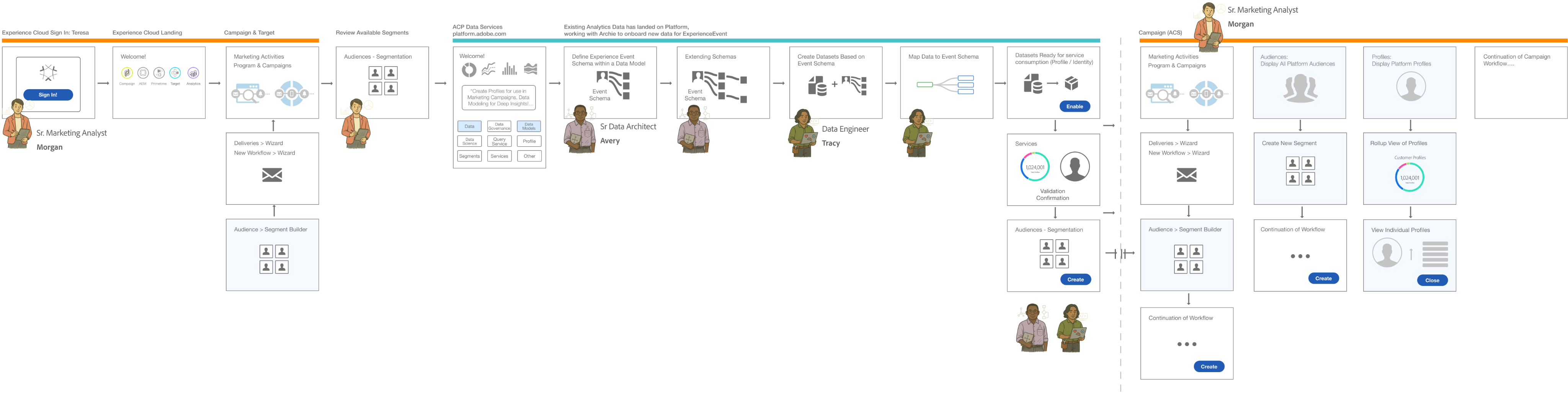
These workflows illustrate how the Schema Editor serves as the “Contract Negotiator” between the Architect’s logic and the System’s reality.
Understanding Schemas & Use Cases
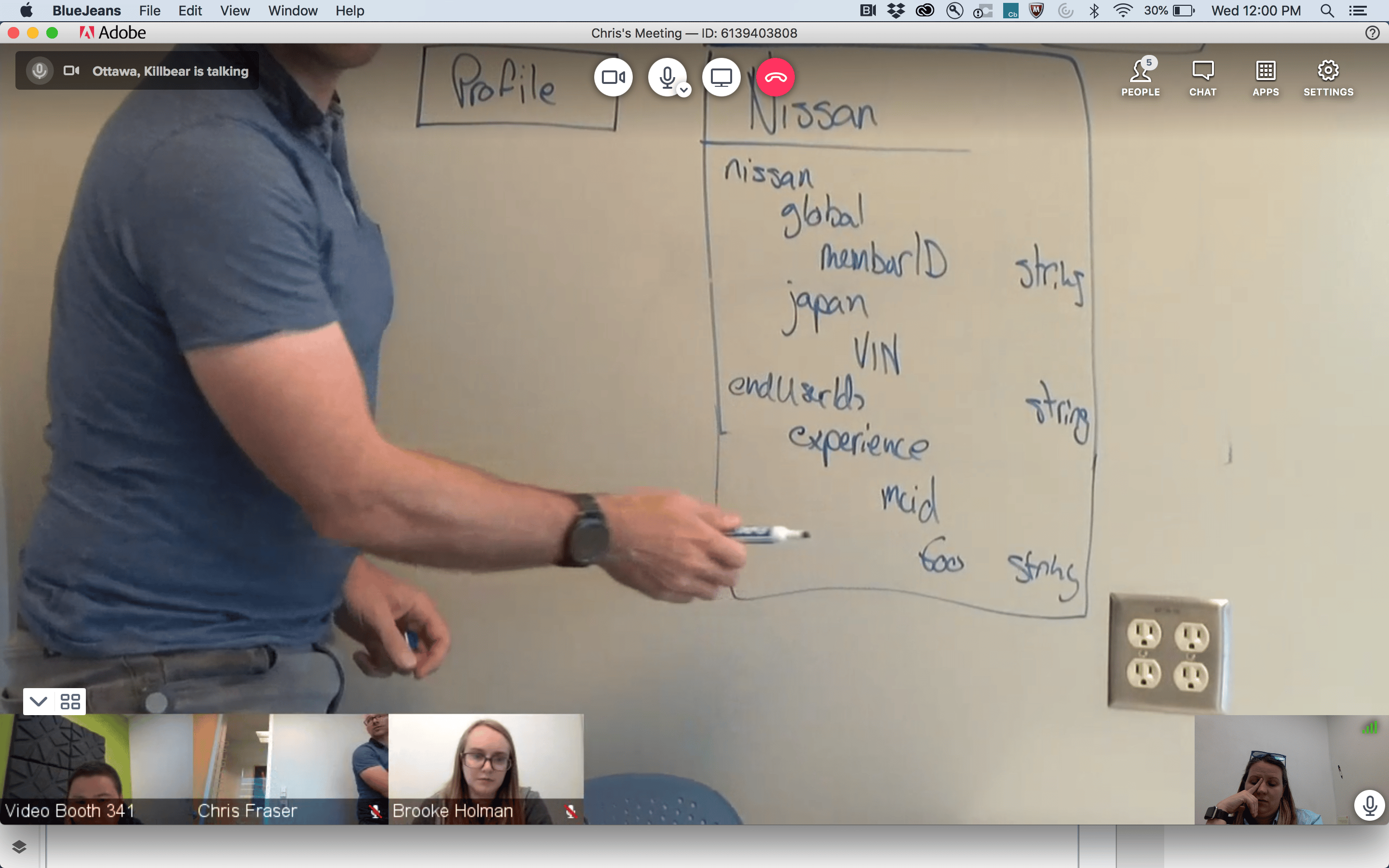
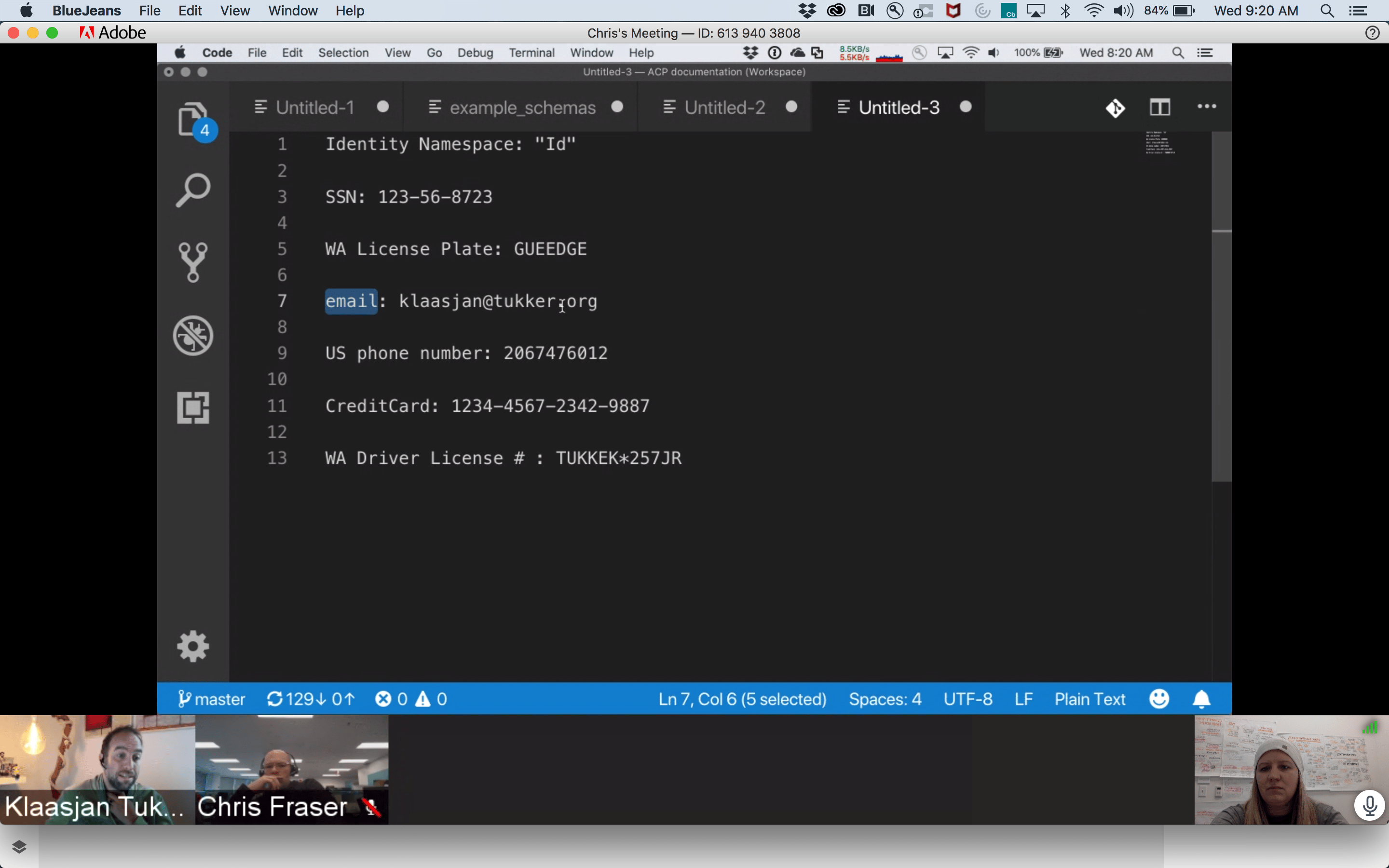

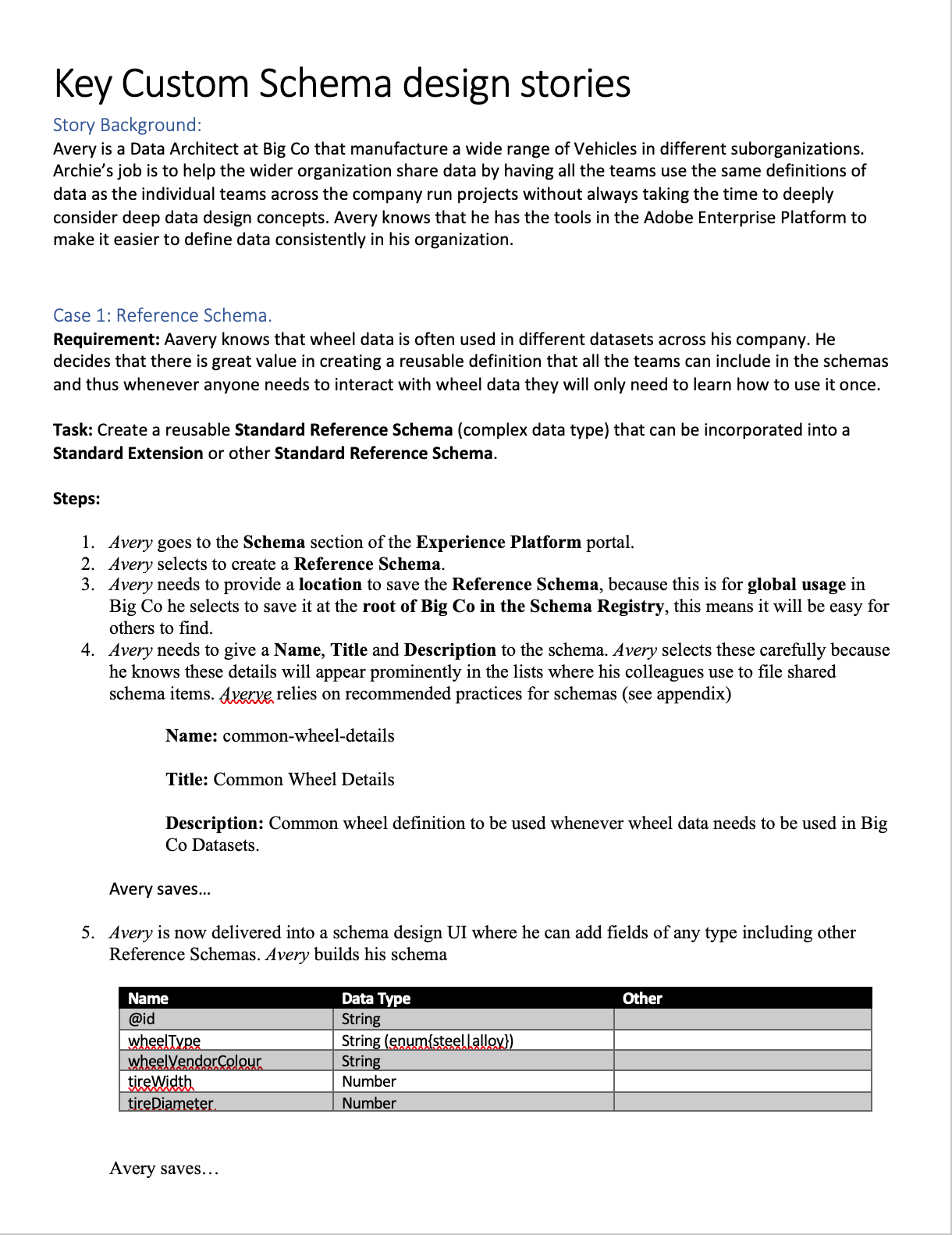
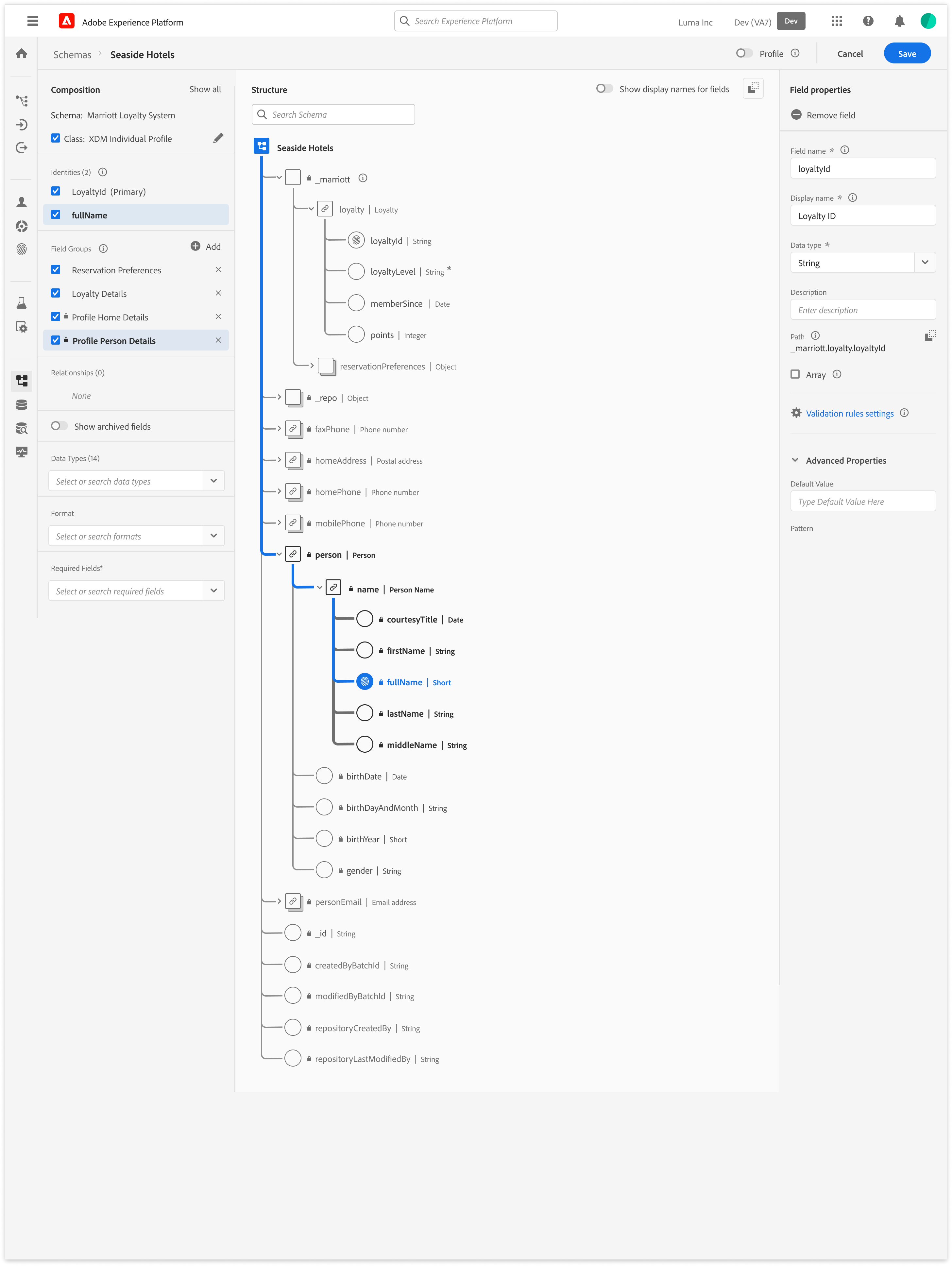
The Architect’s blueprint (Schema Creation)

This flow focuses on the technical “handshake.” The Architect selects a Class, defines the Primary Identity, and extends the schema using Field Groups (Mixins). The editor validates that the structure is ingestion-ready before the architect can “Save,” preventing downstream profile corruption.
The Trigger
A Senior Marketing Analyst identifies a need for new segmentation for a campaign.
The Modeling
A Data Architect creates the schema to onboard the necessary data.
The Engineering
A Data Engineer creates datasets based on that schema and maps the raw data.
The Activation
Once the data is ingested and stitched via the Identity/Profile services, the Marketing Analyst can successfully build the new segments.
The E2E Value Loop
Interface Anatomy & Principles
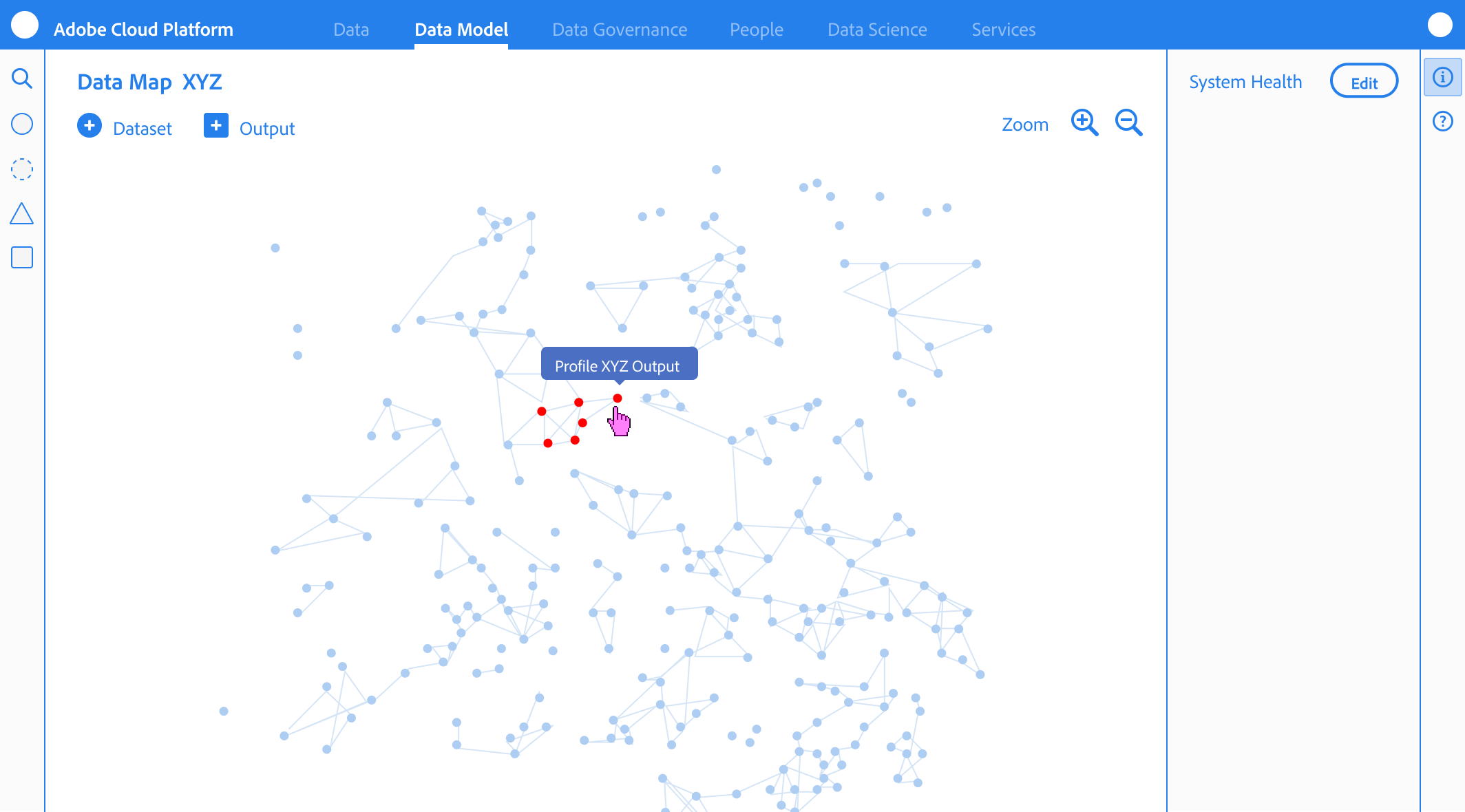
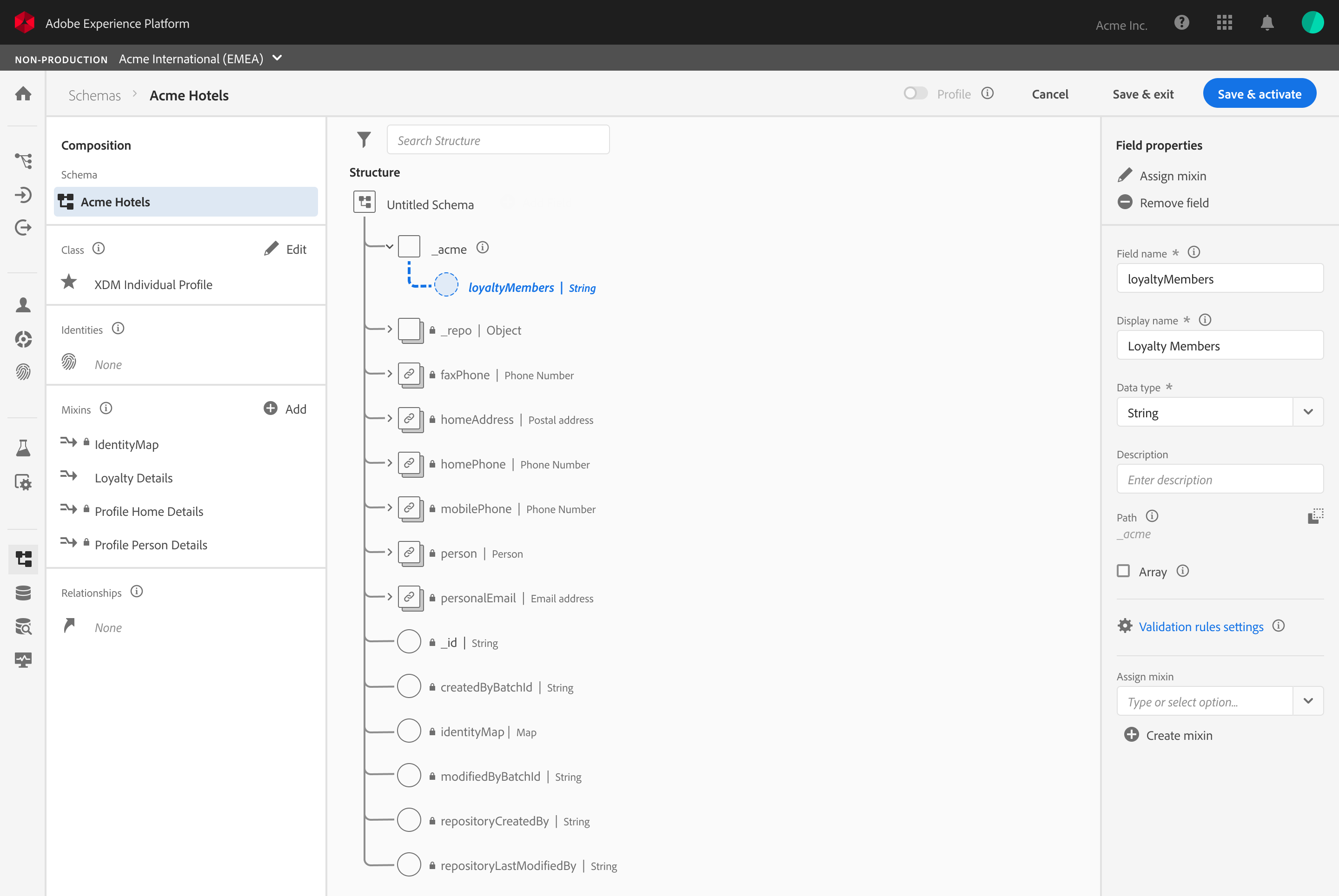
The editor’s design system was built to guide the Senior Data Architect through high-density technical task
Vertical & Horizontal Navigation
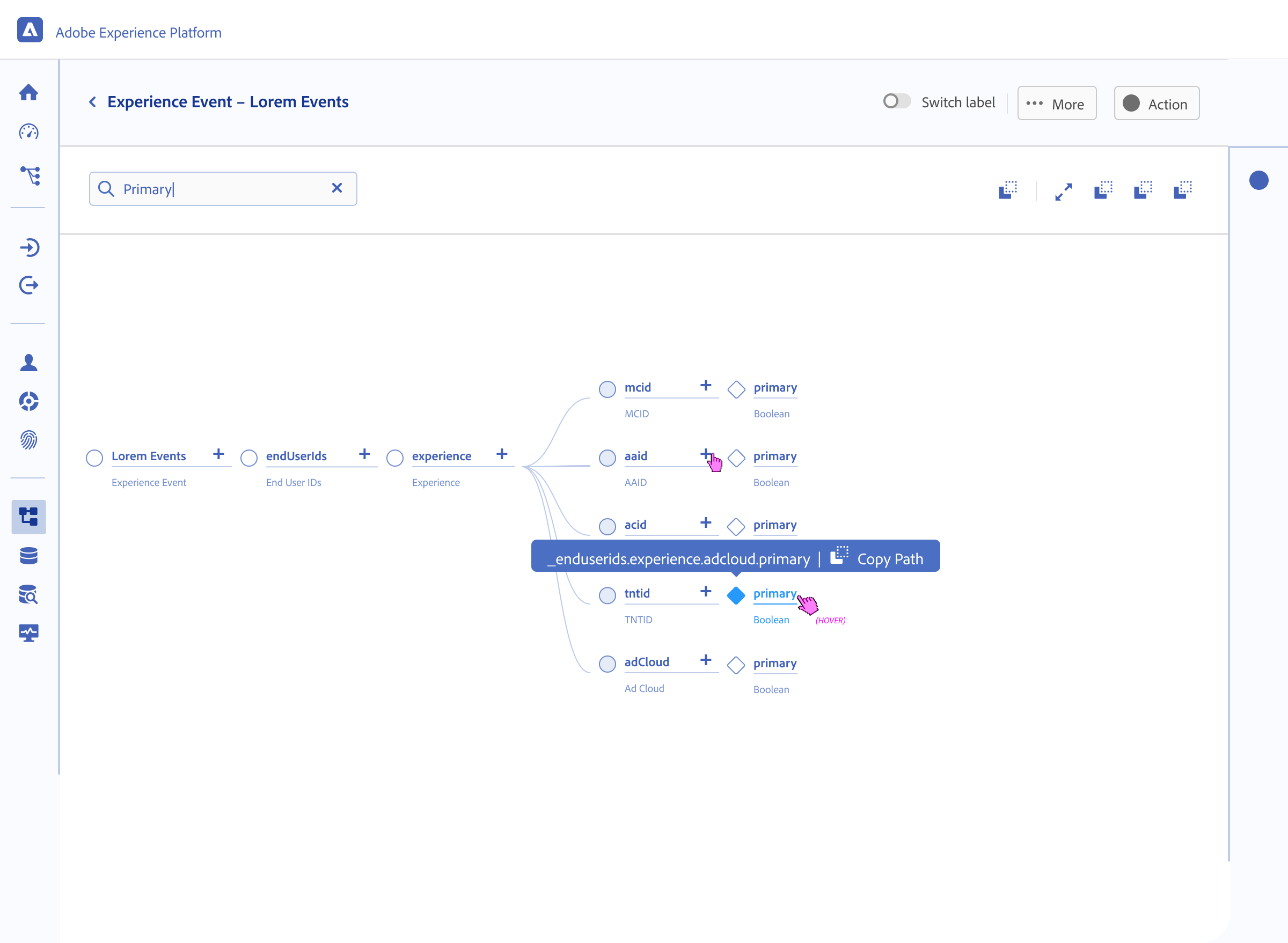
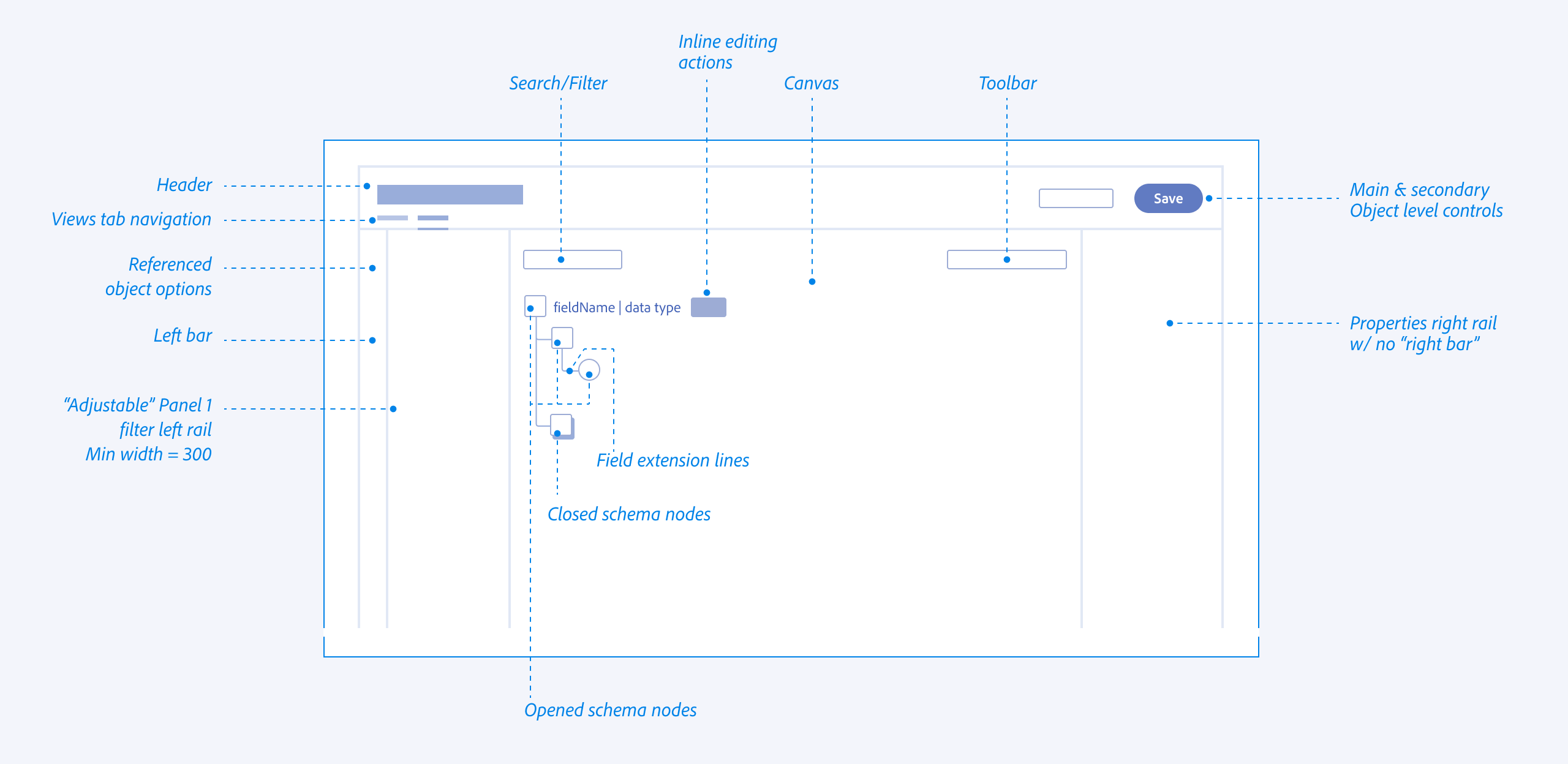
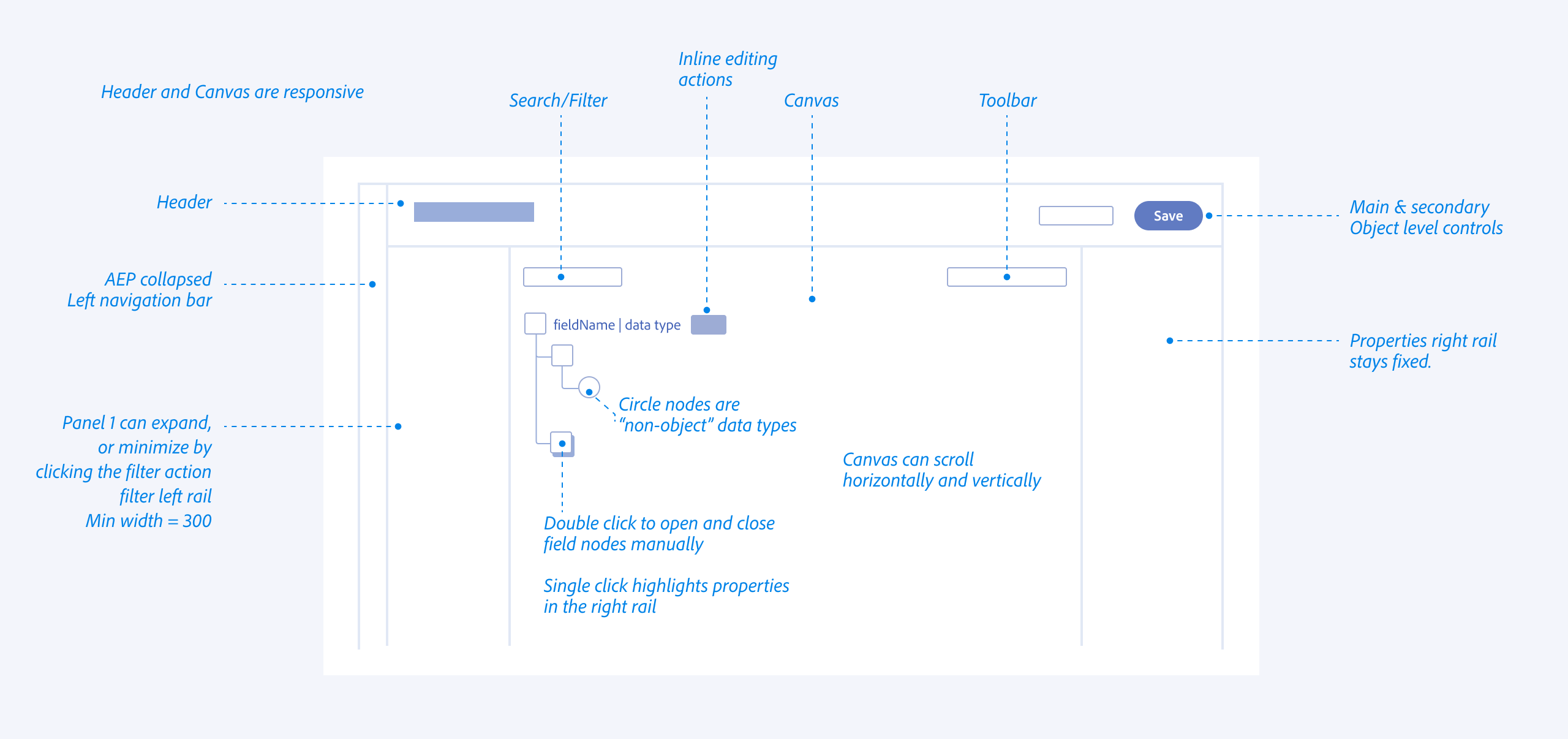
I explored all of the different views and reasons that allowed architects to navigate schemas from abstract, down to deep nested hierarchies (vertical) while maintaining the context of the global schema properties (Horizontal).
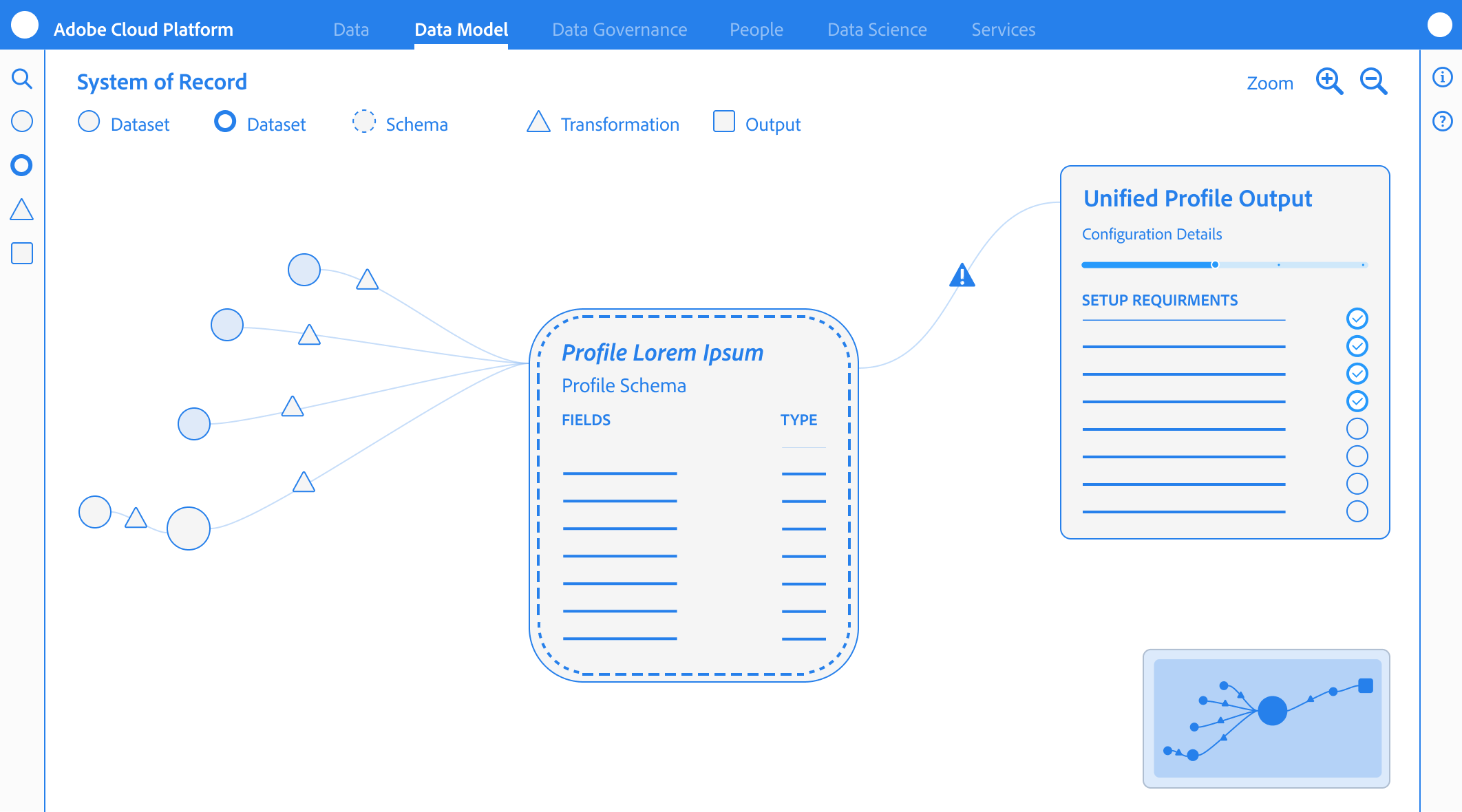
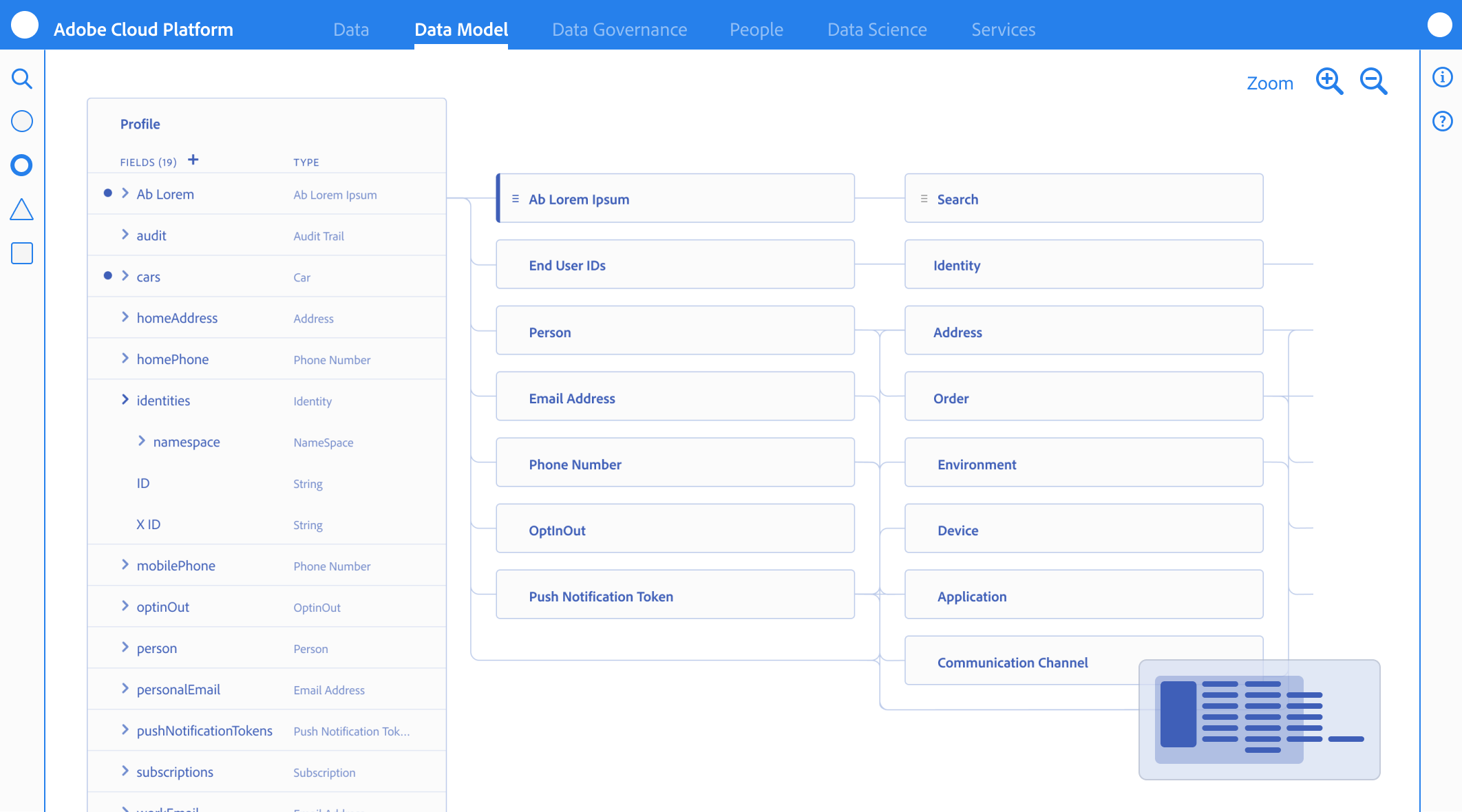
Anatomy
Behavior
Object Orientation Exploration
Taking inventory of objects and meta data required in a schema and understanding what the user cares about most
Iconographic Clarity & System Ownership
I designed a specialized iconography set to distinguish between Adobe-standard templates (fixed/read-only) and Customer-created fields (editable CRUD). This visual distinction provided immediate clarity on what was immutable system logic versus customizable business logic.
Reducing Eye Tracking Fatigue
By standardizing the visual language for different data types (Identities, Attributes, and Relationships), we reduced the cognitive load and eye tracking fatigue inherent in auditing 100+ field schemas

Semantic Guidance
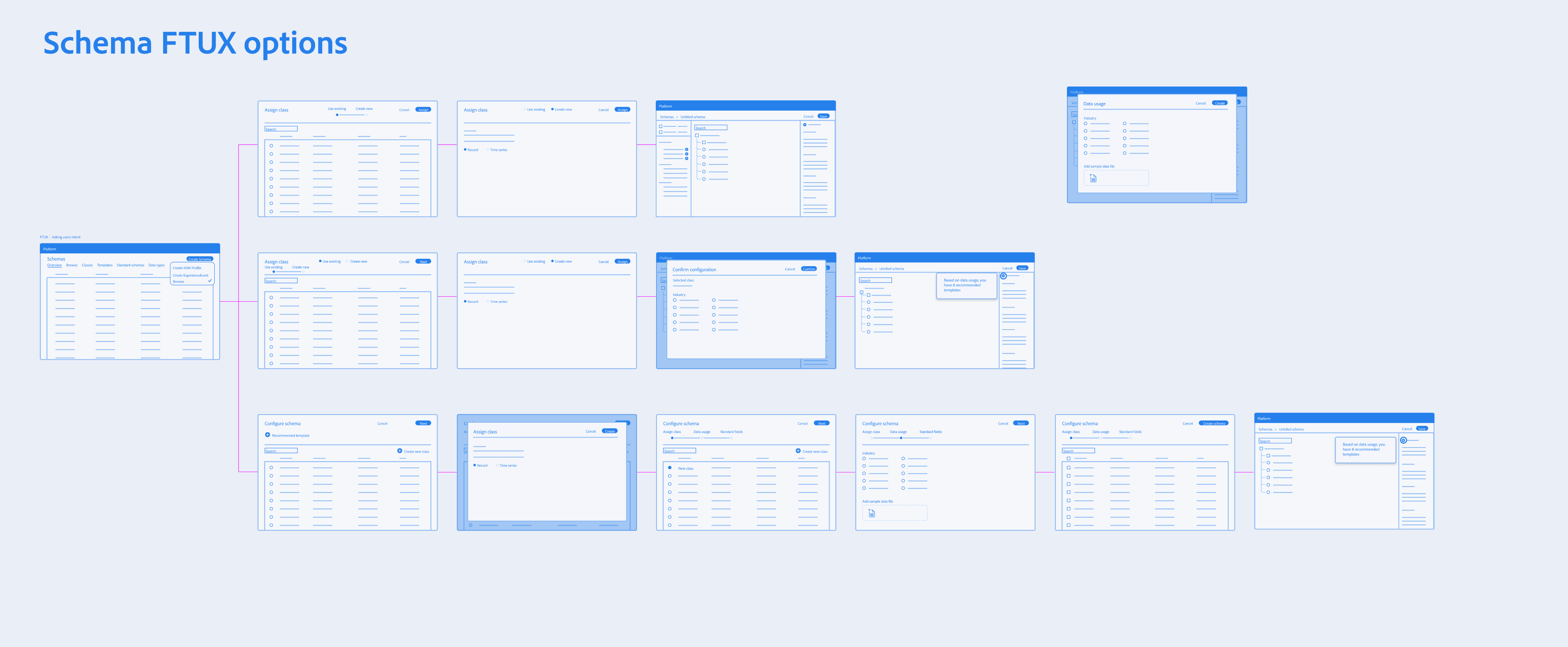
Because terminology like “Class”, and “Mixins” were unfamiliar, the interface relied on contextual education. Tooltips, and FTUX explorations were vetted to help explain the why behind the terminology without blocking the expert’s progress.
System Impact
Validating the Pipeline over the Feature
Instead of measuring the success by feature count, we validated the “Pipeline Readiness.” We intentionally deferred advanced UI capabilities to ensure the foundation data “handshake” was unbreakable.
The Validation Strategy: Pipeline over UI
Success Metric
We tracked “Ingestion Readiness” and the ability for a schema to successfully progress into source configuration and dataset activation
Behavioral Insight
User testing proved that lightweight guidance (tooltips/helper text) was enough for experts to navigate unfamiliar terminology like “Mixins”.
The Intentional Gap
We accepted the risk of differing advanced features (like search/filtering) to prioritize a stable, functional core at GA.
Measuring the “Downstream” Win
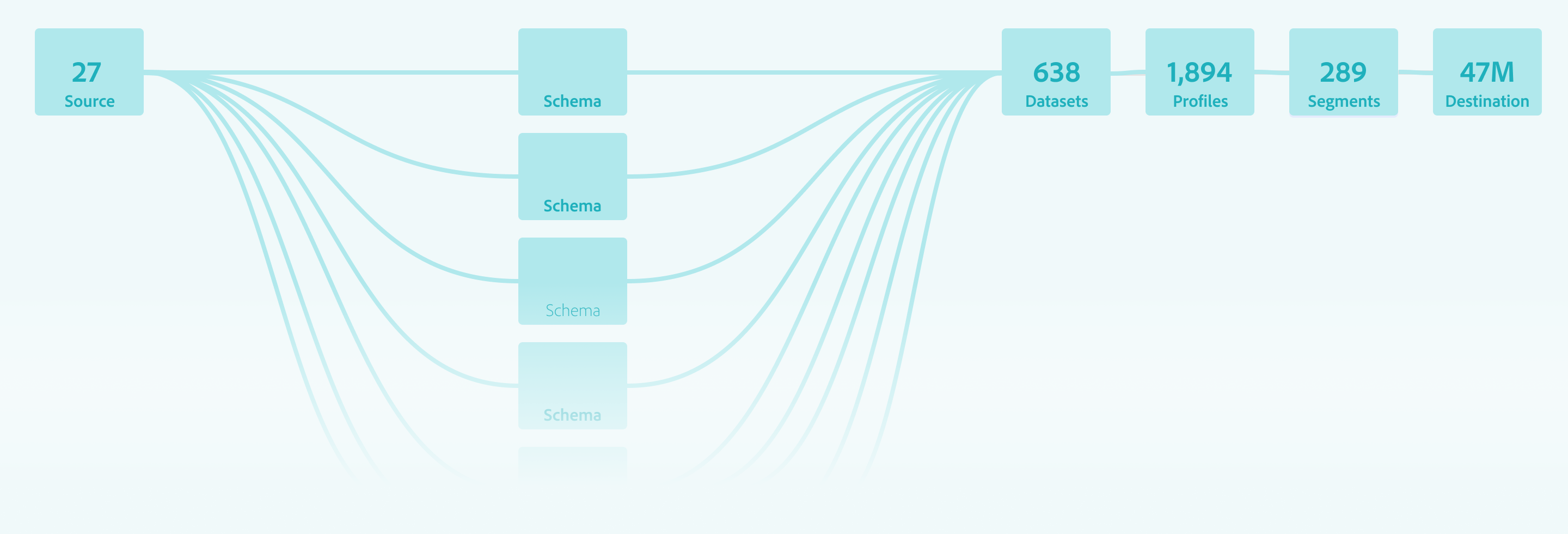
The Schema Editor was validated not as an isolated tool, but as a platform enabler
Source Connection
Enabled successful connection of diverse datasets
Profile Enablement
Confirmed schemas were structurally sound enough to power the Unified Profile without manual intervention
Scale
Proved the system could handle scaling to over 100+ field schemas while maintaining integrity.
Outcomes
Stabilizing the Ecosystem
By focusing on the Data Architect’s need for structural precision over feature breadth, the Schema Editor GA release successfully shifted the platform from a manual, high-error modeling environment to an automated, scalable foundation.
Quantifiable Impact
The following results were measured after the first quarter of GA, demonstrating the success of the “Pipeline Readiness” strategy
-32%
Ingestion Failure
A significant reduction in downstream errors caused by “Confident Mistakes” at the schema level
+38%
Segmentation Confidence
Increased trust from Marketing Analysts in the data being used for high-stakes campaigns
+26%
More Predictable Modeling
Improved consistency in how schemas were extended and reused across different teams.
-20%
Operational Drag
Reduced the need for manual ETL and engineering intervention to “fix” corrupted profile fragments
Qualitative Wins
Beyond the numbers, the editor fundamentally changed how data moved through the Adobe Experience Platform
From Bottleneck to Enabler
Schema creation moved from a slow, code-heavy process to a drag-and-drop experience that accelerated time-to-segment.
Democratic Modeling
The “Mixin” architecture allowed teams to successfully extend schemas without relying on a central engineering team for every change.
Systemic Consistency
The editor enforced a “Global Blueprint” that standardized identity resolution and profile behavior across the entire ecosystem
Retrospective
Strategic Evolution
Post-GA
The journey from 0 to GA provided a wealth of behavioral data that challenged our initial assumptions about how Data Architects would interact with a high-stakes modeling tool. While the system was stable, the “real-world” usage patterns identified clear areas for future strategic refinement.
Terminology:
Jargon vs Mental Models
The “Mixin” Friction
Despite being technically accurate to the system’s architecture, the term “Mixin” proved to be a major hurdle for user comprehension.
The Lesson
In hindsight, I would have pushed harder to replace “Mixins” with “Field Groups” before launch. Testing confirmed that industry-standard terminology reduces the “Technical Wall” more effectively than contextual tooltips.
Integrating Visualization:
ERD & Merge Views
Post-GA Visualization
While we deprioritized the ERD view for GA to focus on the “logic in the weeds,” the need for a macro-level map remained clear.
The Roadmap
My next step would be to introduce a Modeling Workspace that merges the individual schema view with an ERD-style map. This wouldn’t just be a visual aid, but a Merge Preview, allowing architects to see how identities would stitch together across schemas before committing data to the platform.
Learning from Experience
Intent-Based Design
Watching users ignore templates and build their own custom “Field Groups” became our most valuable feedback loop.
The Shift
This observation shifted our roadmap from “providing the answer” (templates) to “facilitating the experiment”, focusing on making the creation of custom Field Groups faster and more intuitive.
The Trust Gap in Templates
Unused Adobe Templates
We initially believed providing pre-built Adobe templates would accelerate the workflow, but analytics showed they were rarely used.
The Behavioral Insight
Architects preferred experimenting from scratch rather than inheriting a pre-defined “Black box”. This was not a failure of the templates, but a signal that experts prioritize full control and transparency when building their foundational data contract.
Related Case Studies
Let’s Work Together
Interested in collaborating on complex UI/UX challenges involving data, AI, or enterprise systems?
I’d love to explore how thoughtful design can drive clarity and business impact.

Get In Touch

About Kelli
Product Designer | AI x Data Systems
Passionate about turning complex data and AI systems into clear, trustworthy, human-centered experiences
Based in: San Francisco, CA
© 2026 Kelli Nordfelt
Overview
Problem
Technical Wall
Design Pivot
System Impact
Outcomes
Retrospective
Schema Editor
Rational Logic Foundations
Establishing the foundational data blueprint for the ecosystem by solving for “confident mistakes” through staged validation and progressive logic
Schema Editor Rapid Prototype
Project Snapshot
The Challenge
Bridging the “Integrity Gap” between user intent and system logic.
The Solution
Staged Validation & Progressive Disclosure.
Key Results
-32% Ingestion Failures | +38% Segmentation Confidence
Primary Users
Senior Data Architects (High-density modeling)
Overview
As Adobe pivoted to a unified data ecosystem, I led the design of the schema modeling environment. This wasn’t just a UI project; it was the creation of the platform’s “Source of Truth.”
To eliminate “Confident Mistakes” (technically valid actions that caused catastrophic downstream failures) I formalized a Staged Validation Framework. This shifted the UX from a “black box “model to a transparent, guided workflow that aligned with the system’s asynchronous reality, resulting in a -32% reduction in ingestion failures.
My Role
As the Design Lead from 0 to GA, I defined the schema editor’s core interaction model. I partnered with two Product Managers, including a dedicated Subject Matter Expert (SME), and a squad of backend and frontend engineers to align technical terminology with user mental models. Together, we orchestrated the end-to-end onboarding flows and established the semantic framework for the platform.
The Problem
Plausible but Broken Outcomes
Before the Adobe Schema Editor, data modeling was a fragmented, high-code process often managed via manual JSON editing or rigid database tools. As we transitioned to a unified platform, we discovered that the primary threat to data integrity wasn’t beginner error, it was “The Illusion of Success”.
Competitive Landscape Analysis
Schema & Data Modeling Tools Across Four Key Dimensions
Database & ERD
Knowleldge Graphs
API & JSON

Enterprise Data Platforms
Apollo
AsyncAPI
Sportlight
Postman
Swaggerhub
Stardog
Neo4j
GraphDB
Protege
SqlDBM
DBDiagram.io
AWS Glue
Snowflake
Oracle SQL Dev
& Data Modeler
Alation
Collicbra
Microsoft
Preview
DatabricksUnity
atlan
Adobe Schema Editor
High-Latency Batch Processing
Rigid Physical Modeling
Abstract Semantic Modeling
Real-Time Event Ingestion
Knowledge Graphs
API & JSON
Database & ERD
Enterprise Platforms
The Unified Position
Adobe Schema Editor (AEP) is uniquely positioned at the convergence of all four domains. Combining abstract semantic modeling with rigid physical constraints, and supporting both real-time event ingestion and batch processing. This makes AEP the only tool capable of unifying these disparate mental models into a single, cohesive Unified Customer Profile.
The “Confident Mistakes”
How small schema decisions fundamentally change system behavior
Avery
Data Architect
“I want to build a valid schema, but the system isn’t telling me it’s functionally broken until the data is already flowing.”
Before
{
"purchaseID": "998877",
"status": "complete",
"amount": 150.00,
"customerID": "C123"
}
After
{
"_id": "998877",
"timestamp": "2024-05-20T10:00:00Z",
"eventType": "commerce.purchases",
"commerce": {
"order": { "amount": 150.00 }
},
"endUserIDs": {
"_experience": {
"email": { "id": "kelli@email.com", "primary": true }
}
}
}
Mental Model
Incorrect
Transaction as Record Class
The Logic
“I’m defining a Purchase object.”
The Result
The system overwrites the record
The profile only shows the most recent purchase
Purchase
$25.00
↓ Overwrites
Purchase
$15.00
System Reality
Correct
Transaction as Time-Series Event Class
The Logic
“I’m defining a Purchase event on a timeline.”
The Result
The system appends the data
You can calculate Lifetime Value (LTV) and frequency
Jan
$15.00
Feb
$25.00
Mar
$30.00
Apr
$20.00
Total LTV: $90.00
Incorrect
Metadata Mentality
The Logic
“I’ll add the email field so we have it on file.”
The Result
The data is orphaned
It exists in the system but cannot link to CRM or web data
Email Field
kelli@email.com
Isolated • No connections
Correct
Structural Pillar
The Logic
“The email is the primary key to merge this data with other sources.”
The Result
The Identity Stitch occurs
The system merges all data tied to kelli@email.com
kelli@email.com
CRM Data
Web Activity
User Profile
Correct
Standardized Schema
The Logic
“Email is a standardized identity field across all sources.”
The Result
Data is merged consistently across systems
Standardized Field
Source A
Source B
Source C
Incorrect
Interchangeable Names
The Logic
“I’ll add the email field so we have it on file.”
The Result
The data is orphaned due to naming inconsistency.
kelli@email.com
emailAddress
kelli@email.com
user_email
kelli@email.com
Cannot merge due to naming inconsistency
Schema decisions define system behavior, not just data structure
The Technical Wall
The Latency Reality
My initial design hypothesis was simple: Preventative Enforcement. I want to build a UI that blocked every incorrect class selection and enforced identity requirements the moment a field was created. However, as I peeled back the architectural layers of the Adobe Experience Platform (AEP), I hit a “Technical Wall”.
The Constraint: “Validation is Asynchronous”
Service Dependency & Latency Map
Schema Editor - Technical Wall Analysis
Schema Editor

Save
User Action: Instant

Orchestration
Layer
API Gateway

The Technical Wall
Schema Registry
200ms+
Identity Graph
High Latency (3s - 8s)
Profile Service
1.2s+
Ingestion Pipeline
Asynchronous
Asynchronous Validation Reality
Total Round Trip > 10s
Fast Connection (<2s)
High Latency (>3s)
Async/Non-blocking
Don’t block users on system latency, design workflows that absorb it
Backend latency made blocking validation impractical, so validation shifted to a staged, asynchronous model that preserved architect flow.
Real-time, synchronous validation was not just a performance goal; it was a physical impossibility within our distributed system. Many of the rules that determine if a schema is “correct” depend on external, high-latency services:
The Identity Graph:
Checking if an identity namespace is valid requires a round-trip to a global graph
Ingestion Dependencies:
Validating a schema’s compatibility with existing data streams happens view asynchronous batch processing.
Cross-Service Logic:
A schema isn’t just a file; it’s a contract between Sources (Inbound) and Destinations (Outbound)
The Risk of “Real-Time” Failure
Engineering confirmed that forcing these checks to happen “one-click” would result in 5-10 second lag times, or worse, silent failures when a dependency was down. From a design perspective, this created a high risk of:
Breaking User Flow:
Forcing a user to wait for a backend “ok” before adding the next field.
False Negatives:
If a validation service timed out, the UI would either have to block the user (frustrating) or let them pass (risky).
The Design Pivot
Reframing Validation
To solve the “Integrity Gap,” We shifted the design strategy from Real-Time Blocking (which was technically impossible due to latency) to Stage Validation. This approach utilized Friction by Design and purposefully slowing down the Data Architect at critical decision points to ensure structural integrity
Progressive Disclosure & Choice Architecture
I reframed the creation flow to prioritize Intent over interface, ensuring the tool functioned as a stable foundation rather than on overwhelming configuration suite.
The Binary Entry Point
Architects were required to choose between Record and Time-Series behaviors immediately to prevent “Confident Mistake” of choosing a static class for event-based data.
The “Mixin” Paradigm
Every field was required to belong to a reusable template (a Mixin), forcing architects to think about global data reuse rather than “flat file” local edits.
Safe Defaults
To balance extensibility with safety, we surfaced required and recommended properties through guided flows while intentionally deferring advanced configuration options to prevent misconfiguration at launch
Workflow Storyboards: From Intent to Activation
These workflows illustrate how the Schema Editor serves as the “Contract Negotiator” between the Architect’s logic and the System’s reality.
Understanding Schemas & Use Cases
The Architect’s blueprint (Schema Creation)
This flow focuses on the technical “handshake.” The Architect selects a Class, defines the Primary Identity, and extends the schema using Field Groups (Mixins). The editor validates that the structure is ingestion-ready before the architect can “Save,” preventing downstream profile corruption.
The E2E Value Loop
The Trigger
A Senior Marketing Analyst identifies a need for new segmentation for a campaign.
The Modeling
A Data Architect creates the schema to onboard the necessary data.
The Engineering
A Data Engineer creates datasets based on that schema and maps the raw data.
The Activation
Once the data is ingested and stitched via the Identity/Profile services, the Marketing Analyst can successfully build the new segments.
Interface Anatomy & Principles
The editor’s design system was built to guide the Senior Data Architect through high-density technical task
Vertical & Horizontal Navigation
I explored all of the different views and reasons that allowed architects to navigate schemas from abstract, down to deep nested hierarchies (vertical) while maintaining the context of the global schema properties (Horizontal).
Anatomy
Behavior
Object Orientation Exploration
Taking inventory of objects and meta data required in a schema and understanding what the user cares about most
Iconographic Clarity & System Ownership
I designed a specialized iconography set to distinguish between Adobe-standard templates (fixed/read-only) and Customer-created fields (editable CRUD). This visual distinction provided immediate clarity on what was immutable system logic versus customizable business logic.
Reducing Eye Tracking Fatigue
By standardizing the visual language for different data types (Identities, Attributes, and Relationships), we reduced the cognitive load and eye tracking fatigue inherent in auditing 100+ field schemas
Semantic Guidance
Because terminology like “Class”, and “Mixins” were unfamiliar, the interface relied on contextual education. Tooltips, and FTUX explorations were vetted to help explain the why behind the terminology without blocking the expert’s progress.
System Impact
Validating the Pipeline over the Feature
Instead of measuring the success by feature count, we validated the “Pipeline Readiness.” We intentionally deferred advanced UI capabilities to ensure the foundation data “handshake” was unbreakable.
Success Metric
We tracked “Ingestion Readiness” and the ability for a schema to successfully progress into source configuration and dataset activation
Behavioral Insight
User testing proved that lightweight guidance (tooltips/helper text) was enough for experts to navigate unfamiliar terminology like “Mixins”.
The Intentional Gap
We accepted the risk of differing advanced features (like search/filtering) to prioritize a stable, functional core at GA.
The Validation Strategy: Pipeline over UI
Measuring the “Downstream” Win
The Schema Editor was validated not as an isolated tool, but as a platform enabler
Source Connection
Enabled successful connection of diverse datasets
Profile Enablement
Confirmed schemas were structurally sound enough to power the Unified Profile without manual intervention
Scale
Proved the system could handle scaling to over 100+ field schemas while maintaining integrity.
Outcomes
Stabilizing the Ecosystem
By focusing on the Data Architect’s need for structural precision over feature breadth, the Schema Editor GA release successfully shifted the platform from a manual, high-error modeling environment to an automated, scalable foundation.
Quantifiable Impact
The following results were measured after the first quarter of GA, demonstrating the success of the “Pipeline Readiness” strategy
-32%
Ingestion Failure
A significant reduction in downstream errors caused by “Confident Mistakes” at the schema level
+38%
Segmentation Confidence
Increased trust from Marketing Analysts in the data being used for high-stakes campaigns
+26%
More Predictable Modeling
Improved consistency in how schemas were extended and reused across different teams.
-20%
Operational Drag
Reduced the need for manual ETL and engineering intervention to “fix” corrupted profile fragments
Qualitative Wins
Beyond the numbers, the editor fundamentally changed how data moved through the Adobe Experience Platform
From Bottleneck to Enabler
Schema creation moved from a slow, code-heavy process to a drag-and-drop experience that accelerated time-to-segment.
Democratic Modeling
The “Mixin” architecture allowed teams to successfully extend schemas without relying on a central engineering team for every change.
Systemic Consistency
The editor enforced a “Global Blueprint” that standardized identity resolution and profile behavior across the entire ecosystem
Retrospective
Strategic Evolution Post-GA
The journey from 0 to GA provided a wealth of behavioral data that challenged our initial assumptions about how Data Architects would interact with a high-stakes modeling tool. While the system was stable, the “real-world” usage patterns identified clear areas for future strategic refinement.
Terminology:
Jargon vs Mental Models
The “Mixin” Friction
Despite being technically accurate to the system’s architecture, the term “Mixin” proved to be a major hurdle for user comprehension.
The Lesson
In hindsight, I would have pushed harder to replace “Mixins” with “Field Groups” before launch. Testing confirmed that industry-standard terminology reduces the “Technical Wall” more effectively than contextual tooltips.
Integrating Visualization:
ERD & Merge Views
Post-GA Visualization
While we deprioritized the ERD view for GA to focus on the “logic in the weeds,” the need for a macro-level map remained clear.
The Roadmap
My next step would be to introduce a Modeling Workspace that merges the individual schema view with an ERD-style map. This wouldn’t just be a visual aid, but a Merge Preview, allowing architects to see how identities would stitch together across schemas before committing data to the platform.
Learning from Experience
Intent-Based Design
Watching users ignore templates and build their own custom “Field Groups” became our most valuable feedback loop.
The Shift
This observation shifted our roadmap from “providing the answer” (templates) to “facilitating the experiment”, focusing on making the creation of custom Field Groups faster and more intuitive.
The Trust Gap in Templates
Unused Adobe Templates
We initially believed providing pre-built Adobe templates would accelerate the workflow, but analytics showed they were rarely used.
The Behavioral Insight
Architects preferred experimenting from scratch rather than inheriting a pre-defined “Black box”. This was not a failure of the templates, but a signal that experts prioritize full control and transparency when building their foundational data contract.
Related Case Studies
Let’s Work Together
Interested in collaborating on complex UI/UX challenges involving data, AI, or enterprise systems?
I’d love to explore how thoughtful design can drive clarity and business impact.
Get In Touch
About Kelli
Product Designer | AI x Data Systems
Passionate about turning complex data and AI systems into clear, trustworthy, human-centered experiences
Based in: San Francisco, CA
© 2026 Kelli Nordfelt
Overview
Problem
Technical Wall

Design Pivot
System Impact
Outcomes
Schema Editor
Rational Logic Foundations
Establishing the foundational data blueprint for the ecosystem by solving for “confident mistakes” through staged validation and progressive logic
Schema Editor Rapid Prototype
Project Snapshot
The Challenge
Bridging the “Integrity Gap” between user intent and system logic.
The Solution
Staged Validation & Progressive Disclosure.
Key Results
-32% Ingestion Failures | +38% Segmentation Confidence
Primary Users
Senior Data Architects (High-density modeling)
Overview
As Adobe pivoted to a unified data ecosystem, I led the design of the schema modeling environment. This wasn’t just a UI project; it was the creation of the platform’s “Source of Truth.”
To eliminate “Confident Mistakes” (technically valid actions that caused catastrophic downstream failures) I formalized a Staged Validation Framework. This shifted the UX from a “black box “model to a transparent, guided workflow that aligned with the system’s asynchronous reality, resulting in a -32% reduction in ingestion failures.
My Role
As the Design Lead from 0 to GA, I defined the schema editor’s core interaction model. I partnered with two Product Managers, including a dedicated Subject Matter Expert (SME), and a squad of backend and frontend engineers to align technical terminology with user mental models. Together, we orchestrated the end-to-end onboarding flows and established the semantic framework for the platform.
The Problem
Plausible but Broken Outcomes
Before the Adobe Schema Editor, data modeling was a fragmented, high-code process often managed via manual JSON editing or rigid database tools. As we transitioned to a unified platform, we discovered that the primary threat to data integrity wasn’t beginner error, it was “The Illusion of Success”.
Competitive Landscape Analysis
Schema & Data Modeling Tools Across Four Key Dimensions
Database & ERD
Knowleldge Graphs
API & JSON
Enterprise Data Platforms

Apollo
AsyncAPI
Sportlight
Postman
Swaggerhub
Stardog
Neo4j
GraphDB
Protege
SqlDBM
DBDiagram.io
AWS Glue
Snowflake
Oracle SQL Dev
& Data Modeler

Alation
Collicbra
Microsoft
Preview
DatabricksUnity
atlan
Adobe Schema Editor
High-Latency Batch Processing
Rigid Physical Modeling
Abstract Semantic Modeling
Real-Time Event Ingestion
Knowledge Graphs
API & JSON
Database & ERD
Enterprise Platforms
The Unified Position
Adobe Schema Editor (AEP) is uniquely positioned at the convergence of all four domains. Combining abstract semantic modeling with rigid physical constraints, and supporting both real-time event ingestion and batch processing. This makes AEP the only tool capable of unifying these disparate mental models into a single, cohesive Unified Customer Profile.
The “Confident Mistakes”
How small schema decisions fundamentally change system behavior
Avery
Data Architect
“I want to build a valid schema, but the system isn’t telling me it’s functionally broken until the data is already flowing.”
Before
{
"purchaseID": "998877",
"status": "complete",
"amount": 150.00,
"customerID": "C123"
}
After
{
"_id": "998877",
"timestamp": "2024-05-20T10:00:00Z",
"eventType": "commerce.purchases",
"commerce": {
"order": { "amount": 150.00 }
},
"endUserIDs": {
"_experience": {
"email": { "id": "kelli@email.com", "primary": true }
}
}
}
Mental Model
Incorrect
Transaction as Record Class
The Logic
“I’m defining a Purchase object.”
The Result
The system overwrites the record
The profile only shows the most recent purchase
Purchase
$25.00
↓ Overwrites
Purchase
$15.00
System Reality
Correct
Transaction as Time-Series Event Class
The Logic
“I’m defining a Purchase event on a timeline.”
The Result
The system appends the data
You can calculate Lifetime Value (LTV) and frequency
Jan
$15.00
Feb
$25.00
Mar
$30.00
Apr
$20.00
Total LTV: $90.00
Incorrect
Metadata Mentality
The Logic
“I’ll add the email field so we have it on file.”
The Result
The data is orphaned
It exists in the system but cannot link to CRM or web data
Email Field
kelli@email.com
Isolated • No connections
Correct
Structural Pillar
The Logic
“The email is the primary key to merge this data with other sources.”
The Result
The Identity Stitch occurs
The system merges all data tied to kelli@email.com
kelli@email.com
CRM Data
Web Activity
User Profile
Correct
Standardized Schema
The Logic
“Email is a standardized identity field across all sources.”
The Result
Data is merged consistently across systems
Standardized Field
Source A
Source B
Source C
Incorrect
Interchangeable Names
The Logic
“I’ll add the email field so we have it on file.”
The Result
The data is orphaned due to naming inconsistency.
kelli@email.com
emailAddress
kelli@email.com
user_email
kelli@email.com
Cannot merge due to naming inconsistency
Schema decisions define system behavior, not just data structure
The Technical Wall
The Latency Reality
My initial design hypothesis was simple: Preventative Enforcement. I want to build a UI that blocked every incorrect class selection and enforced identity requirements the moment a field was created. However, as I peeled back the architectural layers of the Adobe Experience Platform (AEP), I hit a “Technical Wall”.
The Constraint: “Validation is Asynchronous”
Service Dependency & Latency Map
Schema Editor - Technical Wall Analysis
Schema Editor

Save Schema
User Action: Instant

Orchestration
Layer
API Gateway

The Technical Wall
Schema Registry
200ms+

Identity Graph
High Latency (3s - 8s)

Profile Service
1.2s+
Ingestion Pipeline
Asynchronous
Asynchronous Validation Reality
Total Round Trip > 10s
Fast Connection (<2s)
High Latency (>3s)
Async/Non-blocking
Don’t block users on system latency, design workflows that absorb it
Backend latency made blocking validation impractical, so validation shifted to a staged, asynchronous model that preserved architect flow.
Real-time, synchronous validation was not just a performance goal; it was a physical impossibility within our distributed system. Many of the rules that determine if a schema is “correct” depend on external, high-latency services:
The Identity Graph:
Checking if an identity namespace is valid requires a round-trip to a global graph
Ingestion Dependencies:
Validating a schema’s compatibility with existing data streams happens view asynchronous batch processing.
Cross-Service Logic:
A schema isn’t just a file; it’s a contract between Sources (Inbound) and Destinations (Outbound)
The Risk of “Real-Time” Failure
Engineering confirmed that forcing these checks to happen “one-click” would result in 5-10 second lag times, or worse, silent failures when a dependency was down. From a design perspective, this created a high risk of:
Breaking User Flow:
Forcing a user to wait for a backend “ok” before adding the next field.
False Negatives:
If a validation service timed out, the UI would either have to block the user (frustrating) or let them pass (risky).
The Design Pivot
Reframing Validation
To solve the “Integrity Gap,” We shifted the design strategy from Real-Time Blocking (which was technically impossible due to latency) to Stage Validation. This approach utilized Friction by Design and purposefully slowing down the Data Architect at critical decision points to ensure structural integrity
Progressive Disclosure & Choice Architecture
I reframed the creation flow to prioritize Intent over interface, ensuring the tool functioned as a stable foundation rather than on overwhelming configuration suite.
The Binary Entry Point
Architects were required to choose between Record and Time-Series behaviors immediately to prevent “Confident Mistake” of choosing a static class for event-based data.
The “Mixin” Paradigm
Every field was required to belong to a reusable template (a Mixin), forcing architects to think about global data reuse rather than “flat file” local edits.
Safe Defaults
To balance extensibility with safety, we surfaced required and recommended properties through guided flows while intentionally deferring advanced configuration options to prevent misconfiguration at launch
Workflow Storyboards: From Intent to Activation
These workflows illustrate how the Schema Editor serves as the “Contract Negotiator” between the Architect’s logic and the System’s reality.
Understanding Schemas & Use Cases
The Architect’s blueprint (Schema Creation)
This flow focuses on the technical “handshake.” The Architect selects a Class, defines the Primary Identity, and extends the schema using Field Groups (Mixins). The editor validates that the structure is ingestion-ready before the architect can “Save,” preventing downstream profile corruption.
The E2E Value Loop
The Trigger
A Senior Marketing Analyst identifies a need for new segmentation for a campaign.
The Modeling
A Data Architect creates the schema to onboard the necessary data.
The Engineering
A Data Engineer creates datasets based on that schema and maps the raw data.
The Activation
Once the data is ingested and stitched via the Identity/Profile services, the Marketing Analyst can successfully build the new segments.
Interface Anatomy & Principles
The editor’s design system was built to guide the Senior Data Architect through high-density technical task
Vertical & Horizontal Navigation
I explored all of the different views and reasons that allowed architects to navigate schemas from abstract, down to deep nested hierarchies (vertical) while maintaining the context of the global schema properties (Horizontal).
Anatomy
Behavior
Object Orientation Exploration
Taking inventory of objects and meta data required in a schema and understanding what the user cares about most
Iconographic Clarity & System Ownership
I designed a specialized iconography set to distinguish between Adobe-standard templates (fixed/read-only) and Customer-created fields (editable CRUD). This visual distinction provided immediate clarity on what was immutable system logic versus customizable business logic.
Reducing Eye Tracking Fatigue
By standardizing the visual language for different data types (Identities, Attributes, and Relationships), we reduced the cognitive load and eye tracking fatigue inherent in auditing 100+ field schemas
Semantic Guidance
Because terminology like “Class”, and “Mixins” were unfamiliar, the interface relied on contextual education. Tooltips, and FTUX explorations were vetted to help explain the why behind the terminology without blocking the expert’s progress.
System Impact
Validating the Pipeline over the Feature
Instead of measuring the success by feature count, we validated the “Pipeline Readiness.” We intentionally deferred advanced UI capabilities to ensure the foundation data “handshake” was unbreakable.
The Validation Strategy: Pipeline over UI
Success Metric
We tracked “Ingestion Readiness” and the ability for a schema to successfully progress into source configuration and dataset activation
Behavioral Insight
User testing proved that lightweight guidance (tooltips/helper text) was enough for experts to navigate unfamiliar terminology like “Mixins”.
The Intentional Gap
We accepted the risk of differing advanced features (like search/filtering) to prioritize a stable, functional core at GA.
Measuring the “Downstream” Win
The Schema Editor was validated not as an isolated tool, but as a platform enabler
Source Connection
Enabled successful connection of diverse datasets
Profile Enablement
Confirmed schemas were structurally sound enough to power the Unified Profile without manual intervention
Scale
Proved the system could handle scaling to over 100+ field schemas while maintaining integrity.
Outcomes
Stabilizing the Ecosystem
By focusing on the Data Architect’s need for structural precision over feature breadth, the Schema Editor GA release successfully shifted the platform from a manual, high-error modeling environment to an automated, scalable foundation.
Quantifiable Impact
The following results were measured after the first quarter of GA, demonstrating the success of the “Pipeline Readiness” strategy
-32%
Ingestion Failure
A significant reduction in downstream errors caused by “Confident Mistakes” at the schema level
+38%
Segmentation Confidence
Increased trust from Marketing Analysts in the data being used for high-stakes campaigns
+26%
More Predictable Modeling
Improved consistency in how schemas were extended and reused across different teams.
-20%
Operational Drag
Reduced the need for manual ETL and engineering intervention to “fix” corrupted profile fragments
Qualitative Wins
Beyond the numbers, the editor fundamentally changed how data moved through the Adobe Experience Platform
From Bottleneck to Enabler
Schema creation moved from a slow, code-heavy process to a drag-and-drop experience that accelerated time-to-segment.
Democratic Modeling
The “Mixin” architecture allowed teams to successfully extend schemas without relying on a central engineering team for every change.
Systemic Consistency
The editor enforced a “Global Blueprint” that standardized identity resolution and profile behavior across the entire ecosystem
Retrospective
Strategic Evolution Post-GA
The journey from 0 to GA provided a wealth of behavioral data that challenged our initial assumptions about how Data Architects would interact with a high-stakes modeling tool. While the system was stable, the “real-world” usage patterns identified clear areas for future strategic refinement.
Terminology:
Jargon vs Mental Models
The “Mixin” Friction
Despite being technically accurate to the system’s architecture, the term “Mixin” proved to be a major hurdle for user comprehension.
The Lesson
In hindsight, I would have pushed harder to replace “Mixins” with “Field Groups” before launch. Testing confirmed that industry-standard terminology reduces the “Technical Wall” more effectively than contextual tooltips.
Integrating Visualization:
ERD & Merge Views
Post-GA Visualization
While we deprioritized the ERD view for GA to focus on the “logic in the weeds,” the need for a macro-level map remained clear.
The Roadmap
My next step would be to introduce a Modeling Workspace that merges the individual schema view with an ERD-style map. This wouldn’t just be a visual aid, but a Merge Preview, allowing architects to see how identities would stitch together across schemas before committing data to the platform.
Learning from Experience
Intent-Based Design
Watching users ignore templates and build their own custom “Field Groups” became our most valuable feedback loop.
The Shift
This observation shifted our roadmap from “providing the answer” (templates) to “facilitating the experiment”, focusing on making the creation of custom Field Groups faster and more intuitive.
The Trust Gap in Templates
Unused Adobe Templates
We initially believed providing pre-built Adobe templates would accelerate the workflow, but analytics showed they were rarely used.
The Behavioral Insight
Architects preferred experimenting from scratch rather than inheriting a pre-defined “Black box”. This was not a failure of the templates, but a signal that experts prioritize full control and transparency when building their foundational data contract.
Related Case Studies
Let’s Work Together
Interested in collaborating on complex UI/UX challenges involving data, AI, or enterprise systems?
I’d love to explore how thoughtful design can drive clarity and business impact.
Get In Touch
About Kelli
Product Designer | AI x Data Systems
Passionate about turning complex data and AI systems into clear, trustworthy, human-centered experiences
Based in: San Francisco, CA
© 2026 Kelli Nordfelt
Overview
Problem
Technical Wall
Design Pivot
System Impact
Outcomes
Schema Editor
Rational Logic Foundations
Establishing the foundational data blueprint for the ecosystem by solving for “confident mistakes” through staged validation and progressive logic
Schema Editor Rapid Prototype
Project Snapshot
The Challenge
Bridging the “Integrity Gap” between user intent and system logic.
The Solution
Staged Validation & Progressive Disclosure.
Key Results
-32% Ingestion Failures | +38% Segmentation Confidence
Primary Users
Senior Data Architects (High-density modeling)
Overview
As Adobe pivoted to a unified data ecosystem, I led the design of the schema modeling environment. This wasn’t just a UI project; it was the creation of the platform’s “Source of Truth.”
To eliminate “Confident Mistakes” (technically valid actions that caused catastrophic downstream failures) I formalized a Staged Validation Framework. This shifted the UX from a “black box “model to a transparent, guided workflow that aligned with the system’s asynchronous reality, resulting in a -32% reduction in ingestion failures.
My Role
As the Design Lead from 0 to GA, I defined the schema editor’s core interaction model. I partnered with two Product Managers, including a dedicated Subject Matter Expert (SME), and a squad of backend and frontend engineers to align technical terminology with user mental models. Together, we orchestrated the end-to-end onboarding flows and established the semantic framework for the platform.
The Problem
Plausible but Broken Outcomes
Before the Adobe Schema Editor, data modeling was a fragmented, high-code process often managed via manual JSON editing or rigid database tools. As we transitioned to a unified platform, we discovered that the primary threat to data integrity wasn’t beginner error, it was “The Illusion of Success”.
Competitive Landscape Analysis
Schema & Data Modeling Tools Across Four Key Dimensions
Database & ERD
Knowleldge Graphs
API & JSON
Enterprise Data Platforms
Apollo
AsyncAPI
Sportlight
Postman
Swaggerhub
Stardog
Neo4j
GraphDB
Protege
SqlDBM
DBDiagram.io
AWS Glue
Snowflake
Oracle SQL Dev
& Data Modeler
Alation
Collicbra
Microsoft
Preview
DatabricksUnity
atlan
Adobe Schema Editor
High-Latency Batch Processing
Rigid Physical Modeling
Abstract Semantic Modeling
Real-Time Event Ingestion
Knowledge Graphs
API & JSON
Database & ERD
Enterprise Platforms
The Unified Position
Adobe Schema Editor (AEP) is uniquely positioned at the convergence of all four domains. Combining abstract semantic modeling with rigid physical constraints, and supporting both real-time event ingestion and batch processing. This makes AEP the only tool capable of unifying these disparate mental models into a single, cohesive Unified Customer Profile.
The “Confident Mistakes”
How small schema decisions fundamentally change system behavior
Avery
Data Architect
“I want to build a valid schema, but the system isn’t telling me it’s functionally broken until the data is already flowing.”
Before
{
"purchaseID": "998877",
"status": "complete",
"amount": 150.00,
"customerID": "C123"
}
After
{
"_id": "998877",
"timestamp": "2024-05-20T10:00:00Z",
"eventType": "commerce.purchases",
"commerce": {
"order": { "amount": 150.00 }
},
"endUserIDs": {
"_experience": {
"email": { "id": "kelli@email.com", "primary": true }
}
}
}
Mental Model
Incorrect
Transaction as Record Class
The Logic
“I’m defining a Purchase object.”
The Result
The system overwrites the record
The profile only shows the most recent purchase
Purchase
$25.00
↓ Overwrites
Purchase
$15.00
System Reality
Correct
Transaction as Time-Series Event Class
The Logic
“I’m defining a Purchase event on a timeline.”
The Result
The system appends the data
You can calculate Lifetime Value (LTV) and frequency
Jan
$15.00
Feb
$25.00
Mar
$30.00
Apr
$20.00
Total LTV: $90.00
Incorrect
Metadata Mentality
The Logic
“I’ll add the email field so we have it on file.”
The Result
The data is orphaned
It exists in the system but cannot link to CRM or web data
Email Field
kelli@email.com
Isolated • No connections
Correct
Structural Pillar
The Logic
“The email is the primary key to merge this data with other sources.”
The Result
The Identity Stitch occurs
The system merges all data tied to kelli@email.com
kelli@email.com
CRM Data
Web Activity
User Profile
Correct
Standardized Schema
The Logic
“Email is a standardized identity field across all sources.”
The Result
Data is merged consistently across systems
Standardized Field
Source A
Source B
Source C
Incorrect
Interchangeable Names
The Logic
“I’ll add the email field so we have it on file.”
The Result
The data is orphaned due to naming inconsistency.
kelli@email.com
emailAddress
kelli@email.com
user_email
kelli@email.com
Cannot merge due to naming inconsistency
Schema decisions define system behavior, not just data structure
The Technical Wall
The Latency Reality
My initial design hypothesis was simple: Preventative Enforcement. I want to build a UI that blocked every incorrect class selection and enforced identity requirements the moment a field was created. However, as I peeled back the architectural layers of the Adobe Experience Platform (AEP), I hit a “Technical Wall”.
The Constraint: “Validation is Asynchronous”
Service Dependency & Latency Map
Schema Editor - Technical Wall Analysis
Schema Editor
Save Schema
User Action: Instant
Orchestration
Layer
API Gateway
The Technical Wall
Schema Registry
200ms+
Identity Graph
High Latency (3s - 8s)
Profile Service
1.2s+
Ingestion Pipeline
Asynchronous
Asynchronous Validation Reality
Total Round Trip > 10s
Fast Connection (<2s)
High Latency (>3s)
Async/Non-blocking
Don’t block users on system latency, design workflows that absorb it
Backend latency made blocking validation impractical, so validation shifted to a staged, asynchronous model that preserved architect flow.
Real-time, synchronous validation was not just a performance goal; it was a physical impossibility within our distributed system. Many of the rules that determine if a schema is “correct” depend on external, high-latency services:
The Identity Graph:
Checking if an identity namespace is valid requires a round-trip to a global graph
Ingestion Dependencies:
Validating a schema’s compatibility with existing data streams happens view asynchronous batch processing.
Cross-Service Logic:
A schema isn’t just a file; it’s a contract between Sources (Inbound) and Destinations (Outbound)
The Risk of “Real-Time” Failure
Engineering confirmed that forcing these checks to happen “one-click” would result in 5-10 second lag times, or worse, silent failures when a dependency was down. From a design perspective, this created a high risk of:
Breaking User Flow:
Forcing a user to wait for a backend “ok” before adding the next field.
False Negatives:
If a validation service timed out, the UI would either have to block the user (frustrating) or let them pass (risky).
The Design Pivot
Reframing Validation
To solve the “Integrity Gap,” We shifted the design strategy from Real-Time Blocking (which was technically impossible due to latency) to Stage Validation. This approach utilized Friction by Design and purposefully slowing down the Data Architect at critical decision points to ensure structural integrity
Progressive Disclosure & Choice Architecture
I reframed the creation flow to prioritize Intent over interface, ensuring the tool functioned as a stable foundation rather than on overwhelming configuration suite.
The Binary Entry Point
Architects were required to choose between Record and Time-Series behaviors immediately to prevent “Confident Mistake” of choosing a static class for event-based data.
The “Mixin” Paradigm
Every field was required to belong to a reusable template (a Mixin), forcing architects to think about global data reuse rather than “flat file” local edits.
Safe Defaults
To balance extensibility with safety, we surfaced required and recommended properties through guided flows while intentionally deferring advanced configuration options to prevent misconfiguration at launch
Workflow Storyboards: From Intent to Activation
These workflows illustrate how the Schema Editor serves as the “Contract Negotiator” between the Architect’s logic and the System’s reality.
Understanding Schemas & Use Cases
The Architect’s blueprint (Schema Creation)
This flow focuses on the technical “handshake.” The Architect selects a Class, defines the Primary Identity, and extends the schema using Field Groups (Mixins). The editor validates that the structure is ingestion-ready before the architect can “Save,” preventing downstream profile corruption.
The E2E Value Loop
The Trigger
A Senior Marketing Analyst identifies a need for new segmentation for a campaign.
The Modeling
A Data Architect creates the schema to onboard the necessary data.
The Engineering
A Data Engineer creates datasets based on that schema and maps the raw data.
The Activation
Once the data is ingested and stitched via the Identity/Profile services, the Marketing Analyst can successfully build the new segments.
Interface Anatomy & Principles
The editor’s design system was built to guide the Senior Data Architect through high-density technical task
Vertical & Horizontal Navigation
I explored all of the different views and reasons that allowed architects to navigate schemas from abstract, down to deep nested hierarchies (vertical) while maintaining the context of the global schema properties (Horizontal).
Anatomy
Behavior
Object Orientation Exploration
Taking inventory of objects and meta data required in a schema and understanding what the user cares about most
Iconographic Clarity & System Ownership
I designed a specialized iconography set to distinguish between Adobe-standard templates (fixed/read-only) and Customer-created fields (editable CRUD). This visual distinction provided immediate clarity on what was immutable system logic versus customizable business logic.
Reducing Eye Tracking Fatigue
By standardizing the visual language for different data types (Identities, Attributes, and Relationships), we reduced the cognitive load and eye tracking fatigue inherent in auditing 100+ field schemas
Semantic Guidance
Because terminology like “Class”, and “Mixins” were unfamiliar, the interface relied on contextual education. Tooltips, and FTUX explorations were vetted to help explain the why behind the terminology without blocking the expert’s progress.
System Impact
Validating the Pipeline over the Feature
Instead of measuring the success by feature count, we validated the “Pipeline Readiness.” We intentionally deferred advanced UI capabilities to ensure the foundation data “handshake” was unbreakable.
The Validation Strategy: Pipeline over UI
Success Metric
We tracked “Ingestion Readiness” and the ability for a schema to successfully progress into source configuration and dataset activation
Behavioral Insight
User testing proved that lightweight guidance (tooltips/helper text) was enough for experts to navigate unfamiliar terminology like “Mixins”.
The Intentional Gap
We accepted the risk of differing advanced features (like search/filtering) to prioritize a stable, functional core at GA.
Measuring the “Downstream” Win
The Schema Editor was validated not as an isolated tool, but as a platform enabler
Source Connection
Enabled successful connection of diverse datasets
Profile Enablement
Confirmed schemas were structurally sound enough to power the Unified Profile without manual intervention
Scale
Proved the system could handle scaling to over 100+ field schemas while maintaining integrity.
Outcomes
Stabilizing the Ecosystem
By focusing on the Data Architect’s need for structural precision over feature breadth, the Schema Editor GA release successfully shifted the platform from a manual, high-error modeling environment to an automated, scalable foundation.
Quantifiable Impact
The following results were measured after the first quarter of GA, demonstrating the success of the “Pipeline Readiness” strategy
-32%
Ingestion Failure
A significant reduction in downstream errors caused by “Confident Mistakes” at the schema level
+38%
Segmentation Confidence
Increased trust from Marketing Analysts in the data being used for high-stakes campaigns
+26%
More Predictable Modeling
Improved consistency in how schemas were extended and reused across different teams.
-20%
Operational Drag
Reduced the need for manual ETL and engineering intervention to “fix” corrupted profile fragments
Qualitative Wins
Beyond the numbers, the editor fundamentally changed how data moved through the Adobe Experience Platform
From Bottleneck to Enabler
Schema creation moved from a slow, code-heavy process to a drag-and-drop experience that accelerated time-to-segment.
Democratic Modeling
The “Mixin” architecture allowed teams to successfully extend schemas without relying on a central engineering team for every change.
Systemic Consistency
The editor enforced a “Global Blueprint” that standardized identity resolution and profile behavior across the entire ecosystem
Retrospective
Strategic Evolution Post-GA
The journey from 0 to GA provided a wealth of behavioral data that challenged our initial assumptions about how Data Architects would interact with a high-stakes modeling tool. While the system was stable, the “real-world” usage patterns identified clear areas for future strategic refinement.
Terminology:
Jargon vs Mental Models
The “Mixin” Friction
Despite being technically accurate to the system’s architecture, the term “Mixin” proved to be a major hurdle for user comprehension.
The Lesson
In hindsight, I would have pushed harder to replace “Mixins” with “Field Groups” before launch. Testing confirmed that industry-standard terminology reduces the “Technical Wall” more effectively than contextual tooltips.
Integrating Visualization:
ERD & Merge Views
Post-GA Visualization
While we deprioritized the ERD view for GA to focus on the “logic in the weeds,” the need for a macro-level map remained clear.
The Roadmap
My next step would be to introduce a Modeling Workspace that merges the individual schema view with an ERD-style map. This wouldn’t just be a visual aid, but a Merge Preview, allowing architects to see how identities would stitch together across schemas before committing data to the platform.
Learning from Experience
Intent-Based Design
Watching users ignore templates and build their own custom “Field Groups” became our most valuable feedback loop.
The Shift
This observation shifted our roadmap from “providing the answer” (templates) to “facilitating the experiment”, focusing on making the creation of custom Field Groups faster and more intuitive.
The Trust Gap in Templates
Unused Adobe Templates
We initially believed providing pre-built Adobe templates would accelerate the workflow, but analytics showed they were rarely used.
The Behavioral Insight
Architects preferred experimenting from scratch rather than inheriting a pre-defined “Black box”. This was not a failure of the templates, but a signal that experts prioritize full control and transparency when building their foundational data contract.
Related Case Studies
Let’s Work Together
Interested in collaborating on complex UI/UX challenges involving data, AI, or enterprise systems?
I’d love to explore how thoughtful design can drive clarity and business impact.
Get In Touch
About Kelli
Product Designer | AI x Data Systems
Passionate about turning complex data and AI systems into clear, trustworthy, human-centered experiences
Based in: San Francisco, CA
© 2026 Kelli Nordfelt


Overview

Problem

Technical Wall

Design Pivot

System Impact

Outcomes
Schema Editor
Rational Logic Foundations
Establishing the foundational data blueprint for the ecosystem by solving for “confident mistakes” through staged validation and progressive logic
Schema Editor Rapid Prototype

Project Snapshot
The Challenge
Bridging the “Integrity Gap” between user intent and system logic.
The Solution
Staged Validation & Progressive Disclosure.
Key Results
-32% Ingestion Failures | +38% Segmentation Confidence
Primary Users
Senior Data Architects (High-density modeling)
Overview
As Adobe pivoted to a unified data ecosystem, I led the design of the schema modeling environment. This wasn’t just a UI project; it was the creation of the platform’s “Source of Truth.”
To eliminate “Confident Mistakes” (technically valid actions that caused catastrophic downstream failures) I formalized a Staged Validation Framework. This shifted the UX from a “black box “model to a transparent, guided workflow that aligned with the system’s asynchronous reality, resulting in a -32% reduction in ingestion failures.
My Role
As the Design Lead from 0 to GA, I defined the schema editor’s core interaction model. I partnered with two Product Managers, including a dedicated Subject Matter Expert (SME), and a squad of backend and frontend engineers to align technical terminology with user mental models. Together, we orchestrated the end-to-end onboarding flows and established the semantic framework for the platform.
The Problem
Plausible but Broken Outcomes
Before the Adobe Schema Editor, data modeling was a fragmented, high-code process often managed via manual JSON editing or rigid database tools. As we transitioned to a unified platform, we discovered that the primary threat to data integrity wasn’t beginner error, it was “The Illusion of Success”.
Competitive Landscape Analysis
Schema & Data Modeling Tools Across Four Key Dimensions
Database & ERD
Knowleldge Graphs
API & JSON
Enterprise Data Platforms
Apollo
AsyncAPI
Sportlight
Postman
Swaggerhub
Stardog
Neo4j
GraphDB
Protege
SqlDBM
DBDiagram.io
AWS Glue
Snowflake
Oracle SQL Dev
& Data Modeler
Alation
Collicbra
Microsoft
Preview
DatabricksUnity
atlan
Adobe Schema Editor
High-Latency Batch Processing
Rigid Physical Modeling
Abstract Semantic Modeling
Real-Time Event Ingestion
Knowledge Graphs
API & JSON
Database & ERD
Enterprise Platforms
The Unified Position
Adobe Schema Editor (AEP) is uniquely positioned at the convergence of all four domains. Combining abstract semantic modeling with rigid physical constraints, and supporting both real-time event ingestion and batch processing. This makes AEP the only tool capable of unifying these disparate mental models into a single, cohesive Unified Customer Profile.
The “Confident Mistakes”
How small schema decisions fundamentally change system behavior
Avery
Data Architect
“I want to build a valid schema, but the system isn’t telling me it’s functionally broken until the data is already flowing.”
Before
{
"purchaseID": "998877",
"status": "complete",
"amount": 150.00,
"customerID": "C123"
}
After
{
"_id": "998877",
"timestamp": "2024-05-20T10:00:00Z",
"eventType": "commerce.purchases",
"commerce": {
"order": { "amount": 150.00 }
},
"endUserIDs": {
"_experience": {
"email": { "id": "kelli@email.com", "primary": true }
}
}
}
Mental Model
Incorrect
Transaction as Record Class
The Logic
“I’m defining a Purchase object.”
The Result
The system overwrites the record
The profile only shows the most recent purchase
Purchase
$25.00
↓ Overwrites
Purchase
$15.00
System Reality
Correct
Transaction as Time-Series Event Class
The Logic
“I’m defining a Purchase event on a timeline.”
The Result
The system appends the data
You can calculate Lifetime Value (LTV) and frequency
Jan
$15.00
Feb
$25.00
Mar
$30.00
Apr
$20.00
Total LTV: $90.00
Incorrect
Metadata Mentality
The Logic
“I’ll add the email field so we have it on file.”
The Result
The data is orphaned
It exists in the system but cannot link to CRM or web data
Email Field
kelli@email.com
Isolated • No connections
Correct
Structural Pillar
The Logic
“The email is the primary key to merge this data with other sources.”
The Result
The Identity Stitch occurs
The system merges all data tied to kelli@email.com
kelli@email.com
CRM Data
Web Activity
User Profile
Correct
Standardized Schema
The Logic
“Email is a standardized identity field across all sources.”
The Result
Data is merged consistently across systems
Standardized Field
Source A
Source B
Source C
Incorrect
Interchangeable Names
The Logic
“I’ll add the email field so we have it on file.”
The Result
The data is orphaned due to naming inconsistency.
kelli@email.com
emailAddress
kelli@email.com
user_email
kelli@email.com
Cannot merge due to naming inconsistency
Schema decisions define system behavior, not just data structure
The Technical Wall
The Latency Reality
My initial design hypothesis was simple: Preventative Enforcement. I want to build a UI that blocked every incorrect class selection and enforced identity requirements the moment a field was created. However, as I peeled back the architectural layers of the Adobe Experience Platform (AEP), I hit a “Technical Wall”.
The Constraint: “Validation is Asynchronous”
Service Dependency & Latency Map
Schema Editor - Technical Wall Analysis
Schema Editor
Save Schema
User Action: Instant
Orchestration
Layer
API Gateway
The Technical Wall
Schema Registry
200ms+
Identity Graph
High Latency (3s - 8s)
Profile Service
1.2s+
Ingestion Pipeline
Asynchronous
Asynchronous Validation Reality
Total Round Trip > 10s
Fast Connection (<2s)
High Latency (>3s)
Async/Non-blocking
Don’t block users on system latency, design workflows that absorb it
Backend latency made blocking validation impractical, so validation shifted to a staged, asynchronous model that preserved architect flow.
Real-time, synchronous validation was not just a performance goal; it was a physical impossibility within our distributed system. Many of the rules that determine if a schema is “correct” depend on external, high-latency services:
The Identity Graph:
Checking if an identity namespace is valid requires a round-trip to a global graph
Ingestion Dependencies:
Validating a schema’s compatibility with existing data streams happens view asynchronous batch processing.
Cross-Service Logic:
A schema isn’t just a file; it’s a contract between Sources (Inbound) and Destinations (Outbound)
The Risk of “Real-Time” Failure
Engineering confirmed that forcing these checks to happen “one-click” would result in 5-10 second lag times, or worse, silent failures when a dependency was down. From a design perspective, this created a high risk of:
Breaking User Flow:
Forcing a user to wait for a backend “ok” before adding the next field.
False Negatives:
If a validation service timed out, the UI would either have to block the user (frustrating) or let them pass (risky).
The Design Pivot
Reframing Validation
To solve the “Integrity Gap,” We shifted the design strategy from Real-Time Blocking (which was technically impossible due to latency) to Stage Validation. This approach utilized Friction by Design and purposefully slowing down the Data Architect at critical decision points to ensure structural integrity
Progressive Disclosure & Choice Architecture
I reframed the creation flow to prioritize Intent over interface, ensuring the tool functioned as a stable foundation rather than on overwhelming configuration suite.
The Binary Entry Point
Architects were required to choose between Record and Time-Series behaviors immediately to prevent “Confident Mistake” of choosing a static class for event-based data.
The “Mixin” Paradigm
Every field was required to belong to a reusable template (a Mixin), forcing architects to think about global data reuse rather than “flat file” local edits.
Safe Defaults
To balance extensibility with safety, we surfaced required and recommended properties through guided flows while intentionally deferring advanced configuration options to prevent misconfiguration at launch
Workflow Storyboards: From Intent to Activation
These workflows illustrate how the Schema Editor serves as the “Contract Negotiator” between the Architect’s logic and the System’s reality.
Understanding Schemas & Use Cases
The Architect’s blueprint (Schema Creation)
This flow focuses on the technical “handshake.” The Architect selects a Class, defines the Primary Identity, and extends the schema using Field Groups (Mixins). The editor validates that the structure is ingestion-ready before the architect can “Save,” preventing downstream profile corruption.
The E2E Value Loop
The Trigger
A Senior Marketing Analyst identifies a need for new segmentation for a campaign.
The Modeling
A Data Architect creates the schema to onboard the necessary data.
The Engineering
A Data Engineer creates datasets based on that schema and maps the raw data.
The Activation
Once the data is ingested and stitched via the Identity/Profile services, the Marketing Analyst can successfully build the new segments.
Interface Anatomy & Principles
The editor’s design system was built to guide the Senior Data Architect through high-density technical task
Vertical & Horizontal Navigation
I explored all of the different views and reasons that allowed architects to navigate schemas from abstract, down to deep nested hierarchies (vertical) while maintaining the context of the global schema properties (Horizontal).
Anatomy
Behavior
Object Orientation Exploration
Taking inventory of objects and meta data required in a schema and understanding what the user cares about most
Iconographic Clarity & System Ownership
I designed a specialized iconography set to distinguish between Adobe-standard templates (fixed/read-only) and Customer-created fields (editable CRUD). This visual distinction provided immediate clarity on what was immutable system logic versus customizable business logic.
Reducing Eye Tracking Fatigue
By standardizing the visual language for different data types (Identities, Attributes, and Relationships), we reduced the cognitive load and eye tracking fatigue inherent in auditing 100+ field schemas
Semantic Guidance
Because terminology like “Class”, and “Mixins” were unfamiliar, the interface relied on contextual education. Tooltips, and FTUX explorations were vetted to help explain the why behind the terminology without blocking the expert’s progress.
System Impact
Validating the Pipeline over the Feature
Instead of measuring the success by feature count, we validated the “Pipeline Readiness.” We intentionally deferred advanced UI capabilities to ensure the foundation data “handshake” was unbreakable.
The Validation Strategy: Pipeline over UI
Success Metric
We tracked “Ingestion Readiness” and the ability for a schema to successfully progress into source configuration and dataset activation
Behavioral Insight
User testing proved that lightweight guidance (tooltips/helper text) was enough for experts to navigate unfamiliar terminology like “Mixins”.
The Intentional Gap
We accepted the risk of differing advanced features (like search/filtering) to prioritize a stable, functional core at GA.
Measuring the “Downstream” Win
The Schema Editor was validated not as an isolated tool, but as a platform enabler
Source Connection
Enabled successful connection of diverse datasets
Profile Enablement
Confirmed schemas were structurally sound enough to power the Unified Profile without manual intervention
Scale
Proved the system could handle scaling to over 100+ field schemas while maintaining integrity.
Outcomes
Stabilizing the Ecosystem
By focusing on the Data Architect’s need for structural precision over feature breadth, the Schema Editor GA release successfully shifted the platform from a manual, high-error modeling environment to an automated, scalable foundation.
Quantifiable Impact
The following results were measured after the first quarter of GA, demonstrating the success of the “Pipeline Readiness” strategy
-32%
Ingestion Failure
A significant reduction in downstream errors caused by “Confident Mistakes” at the schema level
+38%
Segmentation Confidence
Increased trust from Marketing Analysts in the data being used for high-stakes campaigns
+26%
More Predictable Modeling
Improved consistency in how schemas were extended and reused across different teams.
-20%
Operational Drag
Reduced the need for manual ETL and engineering intervention to “fix” corrupted profile fragments
Qualitative Wins
Beyond the numbers, the editor fundamentally changed how data moved through the Adobe Experience Platform
From Bottleneck to Enabler
Schema creation moved from a slow, code-heavy process to a drag-and-drop experience that accelerated time-to-segment.
Democratic Modeling
The “Mixin” architecture allowed teams to successfully extend schemas without relying on a central engineering team for every change.
Systemic Consistency
The editor enforced a “Global Blueprint” that standardized identity resolution and profile behavior across the entire ecosystem
Retrospective
Strategic Evolution Post-GA
The journey from 0 to GA provided a wealth of behavioral data that challenged our initial assumptions about how Data Architects would interact with a high-stakes modeling tool. While the system was stable, the “real-world” usage patterns identified clear areas for future strategic refinement.
Terminology:
Jargon vs Mental Models
The “Mixin” Friction
Despite being technically accurate to the system’s architecture, the term “Mixin” proved to be a major hurdle for user comprehension.
The Lesson
In hindsight, I would have pushed harder to replace “Mixins” with “Field Groups” before launch. Testing confirmed that industry-standard terminology reduces the “Technical Wall” more effectively than contextual tooltips.
Integrating Visualization:
ERD & Merge Views
Post-GA Visualization
While we deprioritized the ERD view for GA to focus on the “logic in the weeds,” the need for a macro-level map remained clear.
The Roadmap
My next step would be to introduce a Modeling Workspace that merges the individual schema view with an ERD-style map. This wouldn’t just be a visual aid, but a Merge Preview, allowing architects to see how identities would stitch together across schemas before committing data to the platform.
Learning from Experience
Intent-Based Design
Watching users ignore templates and build their own custom “Field Groups” became our most valuable feedback loop.
The Shift
This observation shifted our roadmap from “providing the answer” (templates) to “facilitating the experiment”, focusing on making the creation of custom Field Groups faster and more intuitive.
The Trust Gap in Templates
Unused Adobe Templates
We initially believed providing pre-built Adobe templates would accelerate the workflow, but analytics showed they were rarely used.
The Behavioral Insight
Architects preferred experimenting from scratch rather than inheriting a pre-defined “Black box”. This was not a failure of the templates, but a signal that experts prioritize full control and transparency when building their foundational data contract.
Related Case Studies
Let’s Work Together
Interested in collaborating on complex UI/UX challenges involving data, AI, or enterprise systems?
I’d love to explore how thoughtful design can drive clarity and business impact.

Get In Touch

About Kelli
Product Designer | AI x Data Systems
Passionate about turning complex data and AI systems into clear, trustworthy, human-centered experiences
Based in: San Francisco, CA
© 2026 Kelli Nordfelt